Free Magento Absolute Theme
29 Sep
Things have been pretty quiet around Templates Master for last few days. But there’s a good reason for that. We were working on new free theme for Magento community members. So today we are proud to introduce our new free Absolute Magento TAheme. Feel free to download it from our store or Magento Connect. Check theme demo at our demo store.
- Product preview module!
- Featured product slider!
- Easy color changes
- Easy to upgrade, easy to customise
- Supports all main browsers (IE6,IE7,IE8,FF2,FF3,Opera,Safari)
- Free updates included
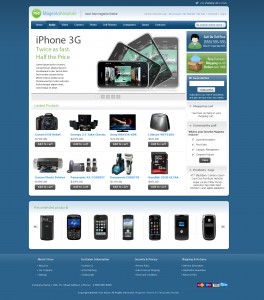
Installation instruction and source .psd file is included in this package.
Template is available under Creative Commons License for commercial and personal use.
Commercial license is available at our store.

Thanks Nice theme
Hi Templemaster
Fantastic theme – Once i am up and running I will donate!
I have a question – as it has not been raised its probably obvious, I have installed via connect manager then added the f001 1.4 apps and skins downloaded from templemaster, followed instructions.
I do not have the slogan.gif or the welcome message showing (even though put in under admin) its baffled me! I have another site running thayerswitchhazel.com and its worked . the only difference i can find is that the latter site mentioned is version 1.4.1.0 and the newer one is 1.4.1.1 anyone else experienced the same? thankyou
Hey, I have featured this theme on eCommerceCircle:
http://www.ecommercecircle.com/free-premium-magento-themes_3913124.html
Thanks!
wow! this is fabulous…thanks! so very much
Hello,
Thanks for this theme. It’s very nice theme. I want to change the color. I want it in pink color. It is possible? I discovered Magento and I would switch my shop as soon as possible
Again thank you thank you
Hello Jadelynn, we are planning to publish additional theme colors after this theme will be tested and all bugs will be fixed.
First of all thanks for your magnificent theme.
Two questions:
1- How can I remove “best free Magento theme” text, next to logo?
2- Also, how can I add featured products?
Cheers
Hello Navid,
#1 You can edit this image skin/frontend/default/f001/images/slogan.gif
#2 You have to create featured attribute and add it to your attributes set. After that you will be able to set products featured.
I tried but its still not showing to me
Nice theme, thank you very much. Is there a way to limit the looping of the slider to just one time? I see frequency, duration, and auto glide, but not a loop control.
Hello Don, sorry but we don’t have this option right now.
I loved the last theme, and this one is just as slick. It is amazing that your two themes blow away any free crap on the internet.
Quite frankly, the only reason why I can’t go back to osCommerce, is that NONE of those installs look like your themes.
THANK YOU
Derek
Theme is great , But how do you set up slider , Or product preview.
Would be real nice if color was more dynamic. ie a field value to change per store. , So I o not have to select different locations
w
how can i update the products view page, I want the additional info to show next to the product image bellow price.
any word on when the extra colors will be available?
Hi, very nice work. A question: for your first free theme, you gave us an example for a dropdown menu. I tried to implement it in the new theme, but it doesn’t work correct. The dropdown function work, but the name of the top word, which initialize the dropdown function, is to high displayed. I can’t solve the problem, perhaps you can help me. (sorry for my bad english, in germany we don’t speak much english)
Hello Rene, what is your store url? Probably you have some missing close tag .
Great theme, thank you!
Can you provide a few details, for example how to add items to the dropdown menu?
Also, are most bugs fixed? I want to make sure it’s safe to use this theme in production. If so I will definitely consider the commercial license.
Hello Mark,
#1 Do you want to add static pages as dropdown?
#2 We have not found yet any serious bug
#3 You should edit featured template catalog/product/featured.phtml
Thanks!
Yes, I do want to add static pages to the menu too.
This is a great theme, thank you. I will definitely come back and purchase a theme for future projects.
Hallo
Would you please tell me how I can set the products as Featured? I had created Featured attribute, and then added it to the Attribute set. But when I create the products I cannot find the place that lets me choose whether to add that product to featured or not.
Thank you for your time,
best, Nicole
hallo again:)
I have already resolved the issue!
thanks again, the theme is lovely
N.
Hey Nicole, Can you tell me how you go the featured products to work? I have been struggling to get them to appear
Many Thanks,
Phil
One more question:
How is it possible to add the product name to the “Featured Products” section? Many of my products look alike, so the name would help.
Thanks!
I really like this theme. Only problem is that even though I followed the instructions, the featured items is populated, but with just the first 25 items in my store, And those items are not even selected to be there,
Hi PC Games Plus, do you have any other extension installed? It should not work like this.
Hi, Yes I have many other extensions installed actually. As follows
AW_Blog
BoutikCircus_DeleteOrders
Bysoft_Advancetag
Flagbit_ChangeAttributeSet
Fontis_Recaptcha
Fontis_Wysiwyg
Fooman_SameOrderInvoiceNumber
Fooman_Speedster
FreeQuickContact
MDN_CustomerUniversalPassword
Mage_Online
Mage_Productlist
Mass_Product_Relater
Morningtime_TextfieldLayeredNav
Order_Status
Remerce_ProductQuestion
TBT_Enhancedgrid
Tags_Cloud
Unirgy_Giftcert
magento_easy_tabs
Any help would be great. Thanks so much for this awesome theme.
Hi,
Any update on my issue? I really like this theme and I am considering purchasing it. I can’t if the issue isn’t Thanks for a great theme!
Hi,
Thanks for helping me get this sorted. You guys are top notch!
What was the answer to this? I have the same problem.
I figured out why the first 25 products showed up even though I had setup the featured attribute and selected certain products to be featured.
When you are setting up the featured attribute near the bottom (in the Frontend Properties section) where it says “Used in product listing” make sure to select “Yes”.
I either totally missed this or it wasn’t in the instructions I read. Thanks for the great theme!
Hi,
I really love this theme. I am a complete newbie to Magento and web design. So I followed the instructions and now have it on my site. It doesnt have any products so it looks slightly different. What I am trying to do now is to add the rest, so that it looks like your demo.
I was wondering if the file I downloaded also includes the other pages in your demo. Like each product page layout and main category page? Also, is it possible to get a the data so I can populate according to your demo, so I can work backwards instead of forwards. You probably dont know my meaning.
Anyway, amazing job. My favorite template/theme so far (paid or free).
We are using magento sample data for all out themes demo. You should install sample data before magento installation.
I was fond of the last one with its many colors, but this one is a step above… And still free ! I hope it will be compliant with the upcoming 1.4 version of Magento and that you will soon offer new colors !
Thanks and go on !
Hi and well done on this new theme, very slick indeed.
I am pretty sure I have followed all the installation steps to the letter, and all looks as expected, except when I tried to edit a product to select “featured” = Yes (Assuming this is what enables it to be a featured product on the front page), I was given the following error message.
SQLSTATE[42S22]: Column not found: 1054 Unknown column ‘created_at’ in ‘field list’
I have backtracked through the steps and will continue to investigate, but thought I would post here in case its something that has already have encountered.
Any and all guidance is appreciated.
Nevermind…solved.
Go to Admin > System > Cache Management
Rebuild Flat Catalog Category
Rebuild Flat Catalog Product
and was then able to save featured products.
Just about to pay for a license for this theme but QUICK VIEW does not work properly.
In Magento, I have ‘After Adding a Product Redirect to Shopping Cart’ set to NO.
I do not want to be directed to a cart every time I add something.
When I use ‘quick view’ to add to cart I just get redirected to a new page where I have to manually click the back button to return to the website.
Is there any way around this?
Thanks
Paolo, please contact us with more details and we will check what is wrong.
I have downloaded this new theme. FAR ABOVE MY EXPECTATIONS. I have already bought some templates from other companies but their paying ones are not as good as your free ones. Featured, slider, newsletter visible is a great step above the previous theme (already great).
I hope you will release new colors and make sure it will be 1.4 compliant.
Yes of course we will continue our support on all our community extensions and themes so don’t worry. As soon as we will have stable version of 1.4 we will release upgraded versions of themes.
Hi, it has to be simple, but I cannot figure out why only my home page shows the theme. All inner pages are showing the blue theme, but the home page is working great. I tried clearing the cache, but no luck.
Hello Roger, please check home page settings. Most likely you have assigned default theme to you home page.
http://blog.templates-master.com/free-magento-absolute-theme/#comment-1748
Hello template-master,
after I click Reply I don’t see my answer, so I decide to make a new post.
You ask me for my store url, here it is: http://www.ppf24.eu . I hope you can help me.
Not sure what is your problem. Does it work with out additional dropdown items?
Hi again,
here is the code I use for the dropdown menu:
Service
Beschriftung
Mietbekleidung
Individualserie
Größentabellen
Anfahrt
Wir über uns
Kontakt
The problem is, the word “Service” in the menu (please take a look at our homepage at http://www.ppf24.eu) is not displayed correct. It’s to high. When you hover with your curser above the word, the dropdown menu opens but you can’t select the points because when you move your mouse down to the points the dropdown menu close (you can’t reach the dropdown menu).
I fixed the problem of the incorrect position of the word “Service” myself. Another option to make a dropdown menu is to create a new cms block, create a new category and there you must chose in the display settings the cms block you want to see after you select the category in your shop menue.
Hello,
I really like this theme. I downloaded the package with graphic sources. I want to change the colors in Photoshop. But how do i slice for magento. I am really confused here, Because in the PSD file there are only three slices of this theme.
Thanks!
Hello Azim, we will update psd file soon.
I’m working on a new magento site and the code seems to be fine, but I can´t locate de New Poducts extension. I´ve added the code to homepage ‘custom design’ Layout Update XML:.
But the New Poducts is still invisible. Why?.
PS: The installation seems to be good.
Hello Sergio, you should set products as new. Please open any product in admin and set “Set Products As new From Date” for it.
Hi guys,
Thanks for this awesome theme, respect! I have just altered the slider files and then I noticed that the 5th slide does not show. I checked this on your demosite and I see the problem. Also the slider buttons underneath do appear not to be always working correctly. When I click on number 3 for instance, I get to see the first picture of number 1. Am I correct or am I making a wrong assumtpion somewhere?
I hope you have a smart solution for this once again.
Best regards and keep up the great work!
Jacco
I’m sorry, I found out that my DSL line had huge issues yesterday which caused the pages to not load entirely. When I test it now on my website and your demosite, it all works fine again!
However I still do have one other question: how can I get the about us page to work properly? It does not work on the demostore for absolute either. I hope you can help out, thanks for your time and trouble?
Jacco
You should create static page in admin > cms > static pages with identifier about or any other you need.
I installed the template including the codes for the home page. The sliders showed up and looked great, but the images are static and will not change. The only time it will change is when you manually click on the slide number button at the bottom. What am i doing wrong? Any help is appreciated. Great Theme…
Please check if script tags are present at your home page content. Also you should check if xml code for home page installed.
Hello Jacco, thanks for reporting bug. It will be fixed in next theme release.
I think there is a bug.
Click on “Quick View” for any product on the main page. Then, choose “Add to Basket”. You get forwarded automatically to the basket page. When clicking on “Continue Shopping”, it returns you to the previous product page with a blank background.
It would be preferable if there is a way to control the behaviour of what happens when clicking on “Add to Basket” from the “Quick View” page. For example, I prefer to have the customer forwarded to the category page of the product he/she chose instead of forwarding them to the basket contents page.
Click on “Quick View” for any product on the main page. Then, choose “Add to Basket”. You get forwarded automatically to the basket page. When clicking on “Continue Shopping”, it returns you to the previous product page with a blank background.
same here, safari/firefox MAC
Hello Paul, thank you for reporting this bug. We will work on it.
Hi,
do you have solutions for this bug ?
And I have a problem with the quickview too..
It works on Firefox 3.6 but not on IE 7 or IE8 with Windows XP. The quick view works when I click on a home page new product but it never stop loading.. So I can’t see the product quickview
Hi. Do you already have the solution for this bug? Here, on Firefox, on the main page, it only shows the gray top bar, not the content. On the categories and products pages it works right
Please post link or screenshot of your store so we can see this problem.
Hello,
When we surf to the template also on your demo server, the buttons get a strange look when scrolling. That with IE 8 and also with IE 7.
For the rest perfect template!!!
When we surf to the template also on your demo server, the buttons get a strange look when scrolling. That with IE 8 and also with IE 7.For the rest perfect template!!!
What is your IE version? We can’t see this problem form several computers.
We are using IE 8 and IE 7 on windows 7, VISTA and XP.
Once we click on the button, the button get disorderd.
Also when scrolling there are white lines coming throught the buttons.
Let me know your email and reference and then i can send you a screenshot.
Regards,
Xavier
right side of buttons (rounded corner) are not aligned correctly ( safari mac ) same with your demo.
also the iphone view layout (when setup as exception with your theme are not displaying correctly.
Hi guys! I just installed your Absolute Theme and it looks really great! I have a problem… I can’t get the featured products to get listed in the homepage. I already create and set the ‘featured’ attribute and complete the field with ‘Yes’, however products doe not appear. Do I have to install some extra extension? Please, help me!
Hello Belen, you should create featured attribute with yes/no value options not jsut yes text. Then you should add it to your default attributes set and set products as featured.
thanks for your replay. I changed the featured input field to Yes/no dropdown and it worked. However, now I upload this theme to my online server, I followed all steps and my featured products dont show on homepage. Not even the featured product panel is visible. What is wrong now??
I have magento 1.3.2.3 on localhost (featured product is working) and magento 1.3.2.4 online (featured products not working)
Hello Belen, have you set your cache off?
Yes, i choose “disabled” for all my cache before start to install this theme, however featured products is not showing
I’ve already solved the problem. I forgot to upload app/etc and app/code folder.
thanks!!!
How can I disable “Quick View” ??
Hello Seme1, you sould edit template files to do so.
I really liked this theme. However, it is not showing any categories. Could not figure out, why? Any help is highly appritiated.
Hello Kaushik, most likely you have assigned different theme to your categories in admin. Please open categories in admin and check custom design tab.
First of all, great template, youve helped me in so many ways. I think that ive got everything figured out now except for one part. In your nice preview picture above here, you can already see about 8 products under the header “new products”. How do i get those there? Its just an empty space..
Thanks for reading and I’d really appreciate an answer!
Sjoerd.
Hello Sjoerd, you should set product as new in admin. Please open product in admin and set “Set products as new from date” for it.
Thank you very much. This is an awesome theme! But I have a problem here, I follow the instructions and set up the featured attribute with Yes/No. And I set one test product both new and featured yes. However,it only showed up in New but not featured. I got nothing in featured. What can I do with it? Thank you again.
Hello Charlene, Can you send us link to your store?
Thank you guys so much. I just find out it’s purely because I didn’t well install it. I just copy the skin and the app files. Now it’s all fixed. It’s really an awesome theme, thank you again!
Are you soon to publish additional colors?
We are planning to do this till the end of the month.
Awesome! Thank you for such great work! Will definitely purchase themes in the future when doing jobs for others!
Just to thanks you !
You release the best free magento theme on the web…
Hi Guys! Thank you for this excellent theme! When will you provide a .psd containing all slices?
Many thanks in advance!
Hello Funguy, you can download psd from our store. But it doesn’t have all slices because we used sprites to make this theme load faster.
Hello There,
I am new to Magento and I tried Absolute theme, it looks fantastic but I have problem in getting the New Products and Featured products displayed in the site even though I added a product. I followed the installation guide given and in my view I have done everything but no luck. Can some one help me please. I would appreciate if someone can explain clearly which files go to which folder and if there is any work around to get them displayed.
Hello Adam, Have you set your products featured and new in admin? Please send us your store url so we can check what is wrong.
Hi… I was hoping that you could show how to add code to the footer links that will show a link to the RSS Feeds page with the RSS icon
Hello PC Games Plus, as far as we can see you did it in right way. You added rss link to footer links block.
Thank you for this great design.
Unfortunately this work for me the home page on Internet Explorer – see: http://www.winterbekleidung.com / magento. In Mozila Firefox everything is going great.
On what is that? About a proposed solution, I’d be very happy!
Hello Stefanie, as far as we can see everything looks good both in IE and FF. What exactly problem do you have?
Hi,
not sure what’s wrong, probably something i am doing, but when i add code to the homepage cms like
{{block type=”catalog/product_list” template=”catalog/product/list_main.phtml”}}
i get an error like
Warning: Mage_Core_Block_Template::include(/var/www/virtualhosts/shop/app/design/frontend/default/default/template/catalog/product/list_main.phtml) [function.Mage-Core-Block-Template-include]: failed to open stream: No such file or directory in /var/www/virtualhosts/shop/app/code/core/Mage/Core/Block/Template.php on line 144
Anything i did wrong during installation?
Thx
Thomas
Hello Thomas, you don’t have this template file var/www/virtualhosts/shop/app/design/frontend/default/default/template/catalog/product/list_main.phtml
I’m having a problem with the slider. If i put in more then 12 slides, strange things happen. Is there maximum number of slides defined?
Hello Jasper, thanks for reporting bug. Our programmer will test this issue.
I get error message when i paste the key
Failed to download magento-community/magento_absolute_theme_free within preferred state “stable”, latest release is version 0.5, stability “beta”, use “channel://connect.magentocommerce.com/community/magento_absolute_theme_free-0.5″ to install
Cannot initialize ‘channel://connect.magentocommerce.com/community/magento_absolute_theme_free’, invalid or missing package file
Install Errors
Package “channel://connect.magentocommerce.com/community/magento_absolute_theme_free” is not valid
PEAR ERROR: install failed
Hello Edmend, you should set preferable state to Beta at your Magento Downloader configuration.
Actually i mean the glider, any slides above 13 go wrong.
Hi. i just wanna thank you for this AMAZING theme. I did some customization to it and here’s the finished product.
http://www.redmousecomputers.com/
My store is also finally opened so i’m very excited
Hi, this is very nice templates. I put him upon his site, but I do not show featured product box. Maybe you can help the hearing
Hello Arensas, you should create featured attribute according to installation manual and assign at least one product as featured in admin.
Thank you for this great theme.
A small bug in Safari 4!!
The right side of buttons is not aligned.
Hello Muri, we will fix this bug in next release.
Have a bug here, same problem as seme1 (http://blog.templates-master.com/free-magento-absolute-theme/#comment-2236)
When product is added to shopping cart and user goes thru continue shopping button he is redirected back to quick view mode, but in full screen (http://www.loja-virtual.uni.cc/ajax/product/quickview/id/166/) – this is the blank background commented.
Hello Marcos, do you get this error at our test server?
Ok. You just switch off the funcionallity of that button CONTINUE SHOPPING, right? Now in the demo server that button is now working anymore also.
Shopping cart must be earranged to be nicer. Take the in this print: http://img25.imageshack.us/img25/3145/hereh.jpg
This empty place is used to show related products so estimate shipping block can’t be moved at this place.
This theme looks very nice. I was a big fan of the Classic theme also. I used it for my webshop untill I made some money to buy another theme that matches better with my store.
When I look at the Absolute theme demo store I notice some strange things happening with the backgrounds. It’s also happening on other websites mentioned in the posts above that use this theme. I’m using Firefox 3.5.5 and Safari 4.0.3 on Mac OS X 10.5.7.
If that can be solved, I think I’ll use this theme for my next store.
Hello Jordy, what exactly problem with backgrounds do you have?
It looks my browser has some problems rendering the page. I see big blue or white area’s and what is supposed to be on top of them isn’t loading at all.
I have the same issue with pages from Google’s Webmaster Tools.
I guess it’s caused by my machine and there’s actually nothing wrong with the sites I try to visit. But if someone has a suggestion how to solve it, that would be great!
I downloaded Magento Absolute Theme and was wondering how i can just take the Featured product slider and Product preview module out of this theme and add it to my website theme?
Sorry Chris, but this is quite complex process and it’s can’t be explained here.
Hi,
Compliments for the great Theme!
I found 2 irregularities:
- texts on the Quick View pop-up are not translated in Dutch. I found the same with on someone else’s German website. Could you please instruct where and how to influence these translations?
- if more than one item is in the shopping basket, the shopping basket icon on the top-right page breaks into 2 lines. Part of the text of the second line becomes hidden under the ‘main frame’. Can I move the basket to the left myself or otherwise remove it?
Thanks for your reply and keep up the good work,
Eric
Hi , Great Theme !!!
I am having the same problem others have had in this thread with the bottom featured box not showing . I have installed magento twice and this theme as I thought I did something wrong in the start . But it keeps coming back looking like this http://i59.photobucket.com/albums/g319/ismadman/Home.jpg
I used webdeveloper and its telling me that that bar down the bottom ( arrow ) is the featured div but for some reason its not populating ?? I have 1 item set to the featured attribute which is the item pictured in the whats new area . I have uploaded the whole package and also disabled my cache settings beforehand . Am I missing something ??? Any help would be great
Hi Ismadman, you should do next steps:
#1 Created “featured” attribute at admin according to installation manual.
#2 Add this attribute to your default attributes set.
#3 Set any product as featured.
Nice theme.
To bad the magento is so damm hard to use, that i cant instal this theme =(
Hello Urgenus, is it ok now?
Some CSS erros on custom.css. Here: http://img340.imageshack.us/img340/4927/templatescsserros.jpg
Hello,
Love your classic theme!
But somehow all the categories I add are automatically placed under the Products tab.
How do I stop this from happening and remove the Products tab and place individual tabs, for each of my products, in line with the Home tab?
Hello Graham, You should edit /app/design/frontend/default/f002/templates/catalog/navigation/top.phtml.
Instead of
<li onmouseover="toggleMenu(this,1)" onmouseout="toggleMenu(this,0)">
<a href="<?php echo $this->getUrl('') ?>"><?php echo $this->__('Products') ?></a>
<ul>
<?php foreach ($this->getStoreCategories() as $_category): ?>
<?php echo $this->drawItem($_category) ?>
<?php endforeach ?>
</ul>
</li>
please paste
<?php foreach ($this->getStoreCategories() as $_category): ?><?php echo $this->drawItem($_category) ?>
<?php endforeach ?>
hi there,
really we love this theme. But this is only Beta version..
how could we install on stable version???
Thanks.
hi there, I successfully installed it… thanks for your great work…
Hello Fu, We will release stable version this week.
Great template, install was really easy. I just have one question, in the screenshot of the template there are 4 products per row on the main screen. But i cant seem to get 4 on my main page… How do i change this?
Thanks again,
Hi there, I don’t how to delete the 2 pictures(/skin/frontend/default/f001/images/media/callout_side1.jpg & callout_side2.jpg) on the right callout column. I try to find it out from the catalog.xml, but failed. Thanks for your kind help..
And actually, I want to know how to show the detailed product name and price at “Featured products” in homepage…. I need to show it as what showed at “new product” area….
Hello Fu, “new product” area shows products set as new in admin. You have to edit featured product listing template catalog/product/featured.phtml to add product name.
Hello Fu, please remove this code from home page xml
<block type="core/template" name="right.callout1" template="callouts/left_col.phtml" before="-"><action method="setImgSrc"><src>images/media/callout_side1.jpg</src></action>
<action method="setImgAlt" translate="alt" module="catalog"><alt>Call Us Toll Free. (555) 555-555</alt></action>
<action method="setLinkUrl"><url>checkout/cart</url></action>
</block>
<block type="core/template" name="right.callout2" template="callouts/left_col.phtml" after="right.callout1">
<action method="setImgSrc"><src>images/media/callout_side2.jpg</src></action>
<action method="setImgAlt" translate="alt" module="catalog"><alt>Free domestic shippings</alt></action>
<action method="setLinkUrl"><url>checkout/cart</url></action>
</block>
It works and I really thanks all of you.
THe Theme looks Impressive. WHen our we going to expect the stable version? Please e-mail us when its done. Thanks and Great work!
Hello Funbrain, there was no serious bugs reported so you can use this theme with out any problem. We decided to delay additional colors till Magento 1.4 unfortunatly.
Hi! First of all, thank you for your great template, it rocks!!. I have a problem that I can’t solve myself, so I ask you a bit of help. When I change at homepage the new.phtml for this line:
(and also changed new.phtml to random.phtml) I get the output duplicated, that is, after the tag the output of random.phtml appears also. random.phtml is the same as new.phtml (which works shows ok) only chaning this line to get the random products instead of new ones:
if (($_products = $this->getLoadedProductCollection()) && $_products->getSize()): ?>
Any idea where I can start looking for the problem? I do not know why when I change the template output from new.phtml to the same with that line changed (and block type catalog/product_list_random) I get the output DIV again after the closing tag.
Thanks million!
Sorry seems the line got formatted and deleted. This is the line I changed on XML of homepage:
block type=”catalog/product_list_random” template=”catalog/product/random.phtml”
Closing tag is /HTML (Also got formatted)
Nevermind, solved =)
Thanks!
First off I wanted to tell you that this is a great template. The only thing that I have run into is getting the top menu to drop down. I noticed that it works fine on the demo site but I can’t see how to make it work on mine.
Thank you for this theme, it looks very great. But i have one little problem with the featured products. Can you help me please? Here is the Link to the Site.
http://magento.charlie543.server4you.de/index.php/
Sorry, i am a magento newbie.
Hello Alf4, what is the problem with featured products slider?
Hi gr8 theme =)
Can you please tell me how to increase no of products in “New Product” By default it is 8. I tried to edit new.phtml but didn’t understand a bit there wht’s happening. please help
Hello Sushil, you should edit xml code for main page
<action method="setProductsCount"><count>8</count></action>I have installed this template and love it. Can someone please direct me to where to set up the product slider like it is on the demo site.
Thanks,
Rick
Hello Rick, do you want to install featured products slider?
Yes, I want to be sure that i am doing it correctly. I see that you also have a product called spotlight, but that seems like something different? I want the bigger picture graphics that you are using in the demo slider.
Thanks,
Rick
figured it out. needed to read the instructions that you do not get from magento connect but from your site.
Thanks
Hi,
Thanks for the great theme. I am trying to adjust it to my needs. I have changed it to 3 columns.
I would like to have the layered navigation in the left column.
I can’t figure out how to do this. Can you give me some advise?
Regards Paul
Hello Paul, you should check magento forum http://www.magentocommerce.com/boards/viewthread/4810. But we don’t think that it’s right to use layered navigation in such way. You should better set category page as your home page.
Hi i need your help.
Iv done everything like said in the instalation help file.
But as u can see this is my homepage how can i assit the featred product there ? and how can i add new product to be there too ?
The only problem i have is how to personel my homepage would be very nice from u to help.
This is the URL of my site http://www.immodriss.com/magento
Thank you.
Hello Coeugh, you have to create featured attribute and add it to your attributes set. After that you will be able to set products featured.
If you are implementing this to 1.4.0.0-beta1, you will probably see misplaced menu item. If you notice the source code, magento now puts to extra tags before the menu caption. To work around this, edit your “/app/design/frontend/default/f001/template/catalog/navigation/top.phtml”
Replace following
————————————————-
getStoreCategories() as $_category): ?>
drawItem($_category) ?>
————————————————-
with this
————————————————-
getStoreCategories() as $_category) {
$search = “”;
$replace = “”;
$text = $this->drawItem($_category);
$text = str_ireplace($search, $replace, $text);
$search = “”;
$replace = “”;
$text = $text;
echo $text;
}
?>
————————————————-
And all will be fine. If you want me to do this for you, you can mail at junaid.mansoor [at] tajmac [dot] net
Cheers
Hi, thanks for the great work, it’s really shining.
but when i use the 1.4 rc1, have the same problem of the header, can’t work under FF or IE 8, no problem under IE6
i tried to follow you to change:
getStoreCategories() as $_category): ?>
drawItem($_category) ?>
but as you see, it have the before getStoreCategories, also have the before drawItem($_category), so it should have prefix like this for other code?
This is page is not displaying HTML codes properly. So please visit this for correct code:
http://www.tajmac.net/portal/knowledgebase/1/Magento-Absolute-Theme-on-14-rc1.html
It is probably striping some code from comment due to security reason. Anyways, you can mail me for that.
“you have to create featured attribute and add it to your attributes set. After that you will be able to set products featured.”
I have done that, I think. I do have a “featured” listing under attributes. Not sure what you mean by setting the products as featured. under products->manage the products under attrib. sets name = default, but I do not see anywhere to change that to featured, under catalog->manage Products-> it shows Massager (default). And no field to set the attribute set to featured.
Rradvice, you should go to admin > catalog > attributes > manage attributes > create attributes. Set attribute code “featured” and catalog input type to “yes/no”.
After that you can open your attributes set at admin > catalog > attributes > manage attributes set and add featured attribute to it. Then you will be able to open product in admin and set featured to “yes”.
I got it working, when creating new products. I can set to featured and they will show up in the bottom of the home page as featured products.
But, if the products already exist, when I locate them under products and click edit the attribute sets do not show up to be changed. at the top of the screen it has Backknobber II (Default) ie [Product Name (Attribute Set) ] and I can not find anywhere to change the assigned attribute
Hello Rradvice, you should add featured attribute to same attributes set as all your products use. You don’t need to create special attributes set for featured products.
You have the list-style currently set to none to enable all the menu layers to work correctly, however, how can I enable them just for the product description as at the moment I cannot use number or bullets.
You should use one of predefined styles. For example disc
<ul class="disc">
….
</ul>
I like your Template and magento. I have been trying to figure it all put.
I will have a main site and multiple stores. and would like to Have each store with different colors. I noticed that you are not going to work on that until ver 1.4.
I looked through all doc trying to get information on the following…
1. Slider.. I was hoping to get the slider working easly for each store. I tried to add featured attribute on products so they would show. But I get nothing. All I really want is on each store main screen to show slider of Pictures of the Store. and maybe some specials. how can that be done easly
2. How do you changes colors
I changed one place.css background. reset.css color changes except for Footer.
Do you have a definitive file.css and what need to change to get different colors.. Just a quick and dirty Documentation
W
Hello Will,
#1 You should install featured attribute in right way. It should be yes/no dropbox and you should add it to your attributes set.
#2 Right now there is no additional colors. So we would recommend to install firebug extension for Firefox and locate each css style you need.
that’s wonderful theme,i want to try it
In the installation files I got from the website, the home page xml is the same as the home page content, I figured this is an error. I also figure this is why my new products and featured section does not show up at all.
Can you please give me the home page xml to see if this fixes the issue.
Other than that, great theme!
Hello Jose, can you send us your store url?
Well, the theme is no longer active, I had to solve with another solution, but your download files does not provide the xml code for the home page. I would like to get it so that I can use it in the future.
Hello Jose, please check installation directory in themes package. You will find all required code there.
GREAT theme! but as the rookie I am I run into an issue that I can’t figure out…
PROBLEM; will not show the footer links even if I followed instructions (and copied content) in install.html… Bottom is blank!
(Set up Footer Links, menu and contacts as CMS static blocks and they are all Enabled and choosed All store views)
A
Hello Ann, what is your footer links block identifier? It should be footer_links. Please contact us at our contact form if you still have this problem.
Hi again, you were right about the identifier: footer_links_f001 didn’t work but footer_links did. Thanks…
Dear TemplatesMaster,
I have installed this theme, version 0.5. May i know if the bugs are fixed in this theme. Where can i get the updates, i have been trying to add a new category, but it did not appear. Please advise.
Thanks
There is no serious bugs in this theme. We will release new version after magento will release 1.4 stable version.
Anyone try this or any other templates on 1.4 rc1 yet are they compatible or will they be?
Hello Tom, no both templates should be upgraded before using with 1.4 rc1.
Love the theme, would you consider releasing a Quick View extension that could also be implemented on it’s own?
Hello Gemma, yes we will release such extension soon.
Are you waiting till final 1.4 is out to start releasing templates for it or are you working on them now as 1.4 rc1 is already out? Are there particular ones that will take priority over others? I assume the free ones will be last but in paid ones are you going to update newest first or any other plan?
Hello Tom, we are waiting for 1.4 final. Please don’t worry we will upgrade free themes as soon as possible.
Hi thanks for your great template, but when i installed the template anything is fine but only the menu bar is misplaced. please help because i checked the top.phtml file is same as the orginal one but the output have two more come out.
Here is the solutions.
http://www.tajmac.net/portal/knowledgebase/1/Magento-Absolute-Theme-on-14-rc1.html
Do comment if it worked for you.
Hello Felix, are you using any navigation extension? Please disable them if you use any.
How can I change the size for the category image? We are able to set different image for different category, but it automatically shrink it to width:475px only.. and it is not centre.. so it looks not good to me. I try to find all the files in app folder or skin folder, nowhere I could edit the size for the category image. Anyone could help?
It isn’t theme issue. You should edit app\design\frontend\default\yourtheme\template\catalog\category\view.phtml.
Thanks a lot!!! I found the files you said from the default theme and edit it. Thank you so much!
Great Template!
But is it possible to random display new Products on the startpage?. I have over 50+ new products an I don’t want to display them all at the same time!
thx
Hello Horkmaster, You can try solution at http://www.magentocommerce.com/boards/viewthread/32720/P15/
Folks, let me say what a fabulous template this is and it is free, (okay, I will have to purchase the commercial license)!
I just installed it using magento connect and ran into some problems with the featured functionality. I did everything in the instruction but kept getting same problem. the problem is available at zhyeon.com/flt122. the homepage.
Sorry, fixed now! ignore the comment above
Thinking how to implement Google adsense on the right column of product list and product view page? Check this out!
http://www.tajmac.net/portal/knowledgebase/3/Google-Ads-in-Magento-Absolute-Theme-on-14-rc1–product-right-column.html
Your comments and votes are welcome.
Regards
J. Sootwala
Hi,
I have tried manually adding pages to the menu by adding them to the “menu” static block. However, I cannot get it to work in such a way that the menu item is higlighted when that page is active. For example, if the user is on the page “Test” or one of its sub-pages, I would like the “Test” menu item to be highlighted. How can I make this happen?
Thanks!
Mark
Hi Mark, you should add your page id to next list
custom.css (line 1)
.cms-home .nav-home a, .contacts-index-index .nav-contacts a, .cms-about-magento-demo-store .nav-about a {
….
}
Thank you!
tried to install via Magento Connect extension key, but it is no longer valid.. Anyone having the same problem?
Hello Vinzsama, have you used magento-community/magento_absolute_theme_free ?
I believe it needs compatibility change for ver1.4
I’d like to remove some of the white space at the bottom of the main column, but I can’t find the CSS that controls that. Any advice?
TIA
Another question:
How can I get bulleted lists to appear properly in product descriptions?
Thanks.
Mark, You should add class=”disc” to your tags.
Hi Folks,
I have looked at this theme before, and ran into some issues customizing it – namely with menu and trying to make slices for the psd!
Is there any guidance on:
a) Making accurate sprites for container.png (so I can recolour it all!) – my attempts never quite look correct with shadows etc
b) Am running into issue where I need to add links to static cms pages to dropdown menu items – I know the code to add a static link to the menu, but to the dropdowns ?
c) menu again – it seems like I may need to add another layer to the menu entirely (something akin to the menu found on http://www.inchoo.net) any pointers ? I can find little documentation!
cheers,
Great theme! I’m really new to Magento, so I have a really basic question… I’ve installed the theme, but it came in blue. How do I change the color to pink? I’ve downloaded the zip file, but don’t know what to do with it.
Thank you very much!
Hi Eugenio, you should simply copy selected color skin files over install blue theme.
It did work! Changed graphic elements and also the color of the text. Thank you so much! I’m really new to Magento and to themes, is there any kind of tutorial you could point me to? I can do self-study and also I don’t want to bother you with every single doubt that occurs me. Thanks again!
Hi, great theme, have installed it today on a new Magento 1.4 install and it doesn’t seem to work!? Has anyone else had problems?
No, please wait for theme upgrade or use Magento 1.3.2.4.
Thankyou for your quick reply I read that you are updating the Themes…Once again excellent service! Please hurry, I am awaiting the updates for activation of a site
Hi Folks,
We are working through a whole host of mods to the template, all going quite nice – however I m coming unstuck when it gets to the menu.
Firstly: How do we create a sub-menu item via a static block ? I can see the top.phtml calling the static block (menu), and i have code akin to ‘About Us‘in my block – I have tried adding an indented list item but no joy!
Secondly am I right in thinking that I can change the menu dynamically via top.phtml (spome form of if/else ont he menu call) ? In this instance I have product anchor links on my horizontal menu (i.e. products_1, products_b) – I would like to replace these with ‘store’ – and when store is selected show a the product options on their own horizontal menu.
I am currently using this amazing theme for my parents website. I do however have a problem with it, due to the amount of categories within the catalog it makes the navigation go over on to two lines, thus making it look bad.
Is there anyway to change the navigation setup, instead of showing all the categories in the navigation, but to have one link which when rolledover, it would display all the categories?
Any help would be much appreicated.
Hello Craig, You can hide navigation items in top menu via css. Each category marked with css class (nav-apparel, nav-electronics and so on). You can check source code of your store page for all class names. Then you will be able to out list of cateogries to hide in your custom.css. So it will look like this
.header-nav .nav-apparel, .header-nav .nav-electronics {display: none;}Craig,
You could create a root category called “Products” and then put all the other categories under that. Very easy.
Mark
That’s also good way to solver problem with too much root categories.
Firstly great theme.i’ve just installed this theme today and I’m really impressed-migrated from classic theme.the only problem is i am trying to put product names on Featured products.so far i know i have to edit the featured.phtml and i don’t know what to edit,thanks
Hi Kelvin, you can put same code as you have in catalog/product/list.phtml
<h5><a href="<?php echo $_product->getProductUrl() ?>" title="<?php echo $this->htmlEscape($_product->getName()) ?>"><?php echo $this->htmlEscape($_product->getName()) ?></a></h5>Hi,
I love your theme. Just got everything working yeaterday and when I tried to add a signup block, I cleared the cache and all the products along with the nav bar is missing. I switch to the blank theme so every thing is intact. I figured it must be something in the template. I also applied this fix: http://www.tajmac.net/portal/knowledgebase/1/Magento-Absolute-Theme-on-14-rc1.html but no luck. What am I doing wrong? Please help!
Thank you so much!
Hello Christine, please contact us with your store details and we will check what’s wrong.
Hello,
Thank you for a beautiful theme. I had everything running perfectly then I decided to add a static block and the menu and all the products disappeared. I know it’s something that I must have done to the theme because the default base theme works when I switch it.
Please help, Thanks!
Christine
Hello Christine, please check code in static block ‘menu’. It should not have tags. Most likely WISISYG editor added this tags and it’s broken top menu code.
Is anyone getting good results with the new 1.4-compatible version? The layout is completely broken for me and I can’t get it fixed. Any advice would help. (Clean 1.4 install.)
Hello Mark, please update your Absolute Magento Theme from Magento Connect. We had broken package at our store for 1-2 days.
Hi
I am getting confused about two methods of installing the theme.
1)First method is describe in install.html of your zip package (ready v.1.3.2.4). in this method I am manually required to upload files to server, add home page content code, add static blocks, add features and assigned to feature set, selecting theme in admin etc.
2)Second method is via magento connect (Megento 1.4 compatible- magento-community/magento_absolute_theme_free) , after installing via this method do we still need to do any other manual steps? such as creating static blocks, adding feature to feature sets , copying files to server etc?
Also first method only has the version 1.3.2.4 and the second method offers beta 1.4..please tell us how can go about doing the installation, what method should i adopt?
I finished installation, My home page does npt look so good..http://betterfuture.x10hosting.com/ecomatic.com.au/
Can anyone please help me sort this?
Regards
I am going to install the (ready v.1.3.2.4), but after u released 1.4 stable version , is there any easier way to upgrade ? or i would have to do the whole process again?
Hi Aqva, 1.4 is already release and you can install it both from Magento connect or our store. We do reccomend to use 1.4 on new stores. Upgrading themes is quite difficult process.
Hello my friends!
Is there a way to change the width of the left-column? I’m using the 3-column design but my left callout images are smaller than 195 pixels. I would like to make left column smaller and use the extra space in the middle column (where the products are).
Thank you!
You should edit css styles.css (line 103)
.col-left {
…..
width:195px;
}
I finished installation, My home page does npt look so good..
http://betterfuture.x10hosting.com/ecomatic.com.au/
Can anyone please help me sort this?
Regards
I have fixed the problem..now my home page looks great..
I had to install the newer version of theme via megento connect. and change the home page content code with the code which is shown in intall.html (including in v1.3.2.4) package.
One problem, when hovering the mouse over the featured product, the image is not popping out as it does in the demo site.
my site address: ecomatic.com.au
Sorry but we can’t access ecomatic.com.au. You server show “Out of memory” error. You should contact your hosting and ask to increase memory allocation limit.
you can access now, its up and running
How can I remove this line from the bottom of the page?
© 2008 Magento Demo Store. All Rights Reserved. Magento Theme by Templates Master
debug profiler doesn’t seems to work with this theme..? any suggestion?
You should add <?php echo $this->getChildHtml() ?> to your footer.phtml to see profiler.
i have tried your code getChildHtml() ?> , but this doesn’t bring out profiler view for my frontend.
btw i already have this code getChildHtml(‘store_switcher’) ?> in footer.phtml
I just downloaded the file and it is still without color package. Will there be a color package for this theme? It would be awesome. I need it in dark pink/purple color. A few months ago you guys said it would be available in different colors. Is this still correct?
Any help would be appreciated.
Yes it’s correct but additional colors will be available after we will finish upgrading themes.
I managed to sort the category problem out now, thanks!
I have a tiny problem, when you click on a category that has a product within it i get an error :
Warning: Division by zero in /blah/blah/public_html/shop/app/design/frontend/default/f001/template/catalog/product/list.phtml on line 93
Its only when there is a product within the category, when there is no products within the category, its fine.
Any help?
Hello Graig, what is your magento version? This error is caused by missing number of default collumns. You can fix it by editing /blah/blah/public_html/shop/app/design/frontend/default/f001/template/catalog/product/list.phtml
$_columnCount = $this->getColumnCount(); to $_columnCount = 3;
Hi,
first of all, I’m sorry for my english bad.
We have a problem with cart. How do we do to delete a product from the cart?
On the top, We have the possibility to delete from the cart every product, but it’s doesn’t work.
In checkout we don’t see the ceckbox for to delete the products. The product is deletable only when we updeted to 0 product
Thanks
Hello Eraldo, there are 2 missing icons in last package. We will update theme soon.
We have successfully implemented Store Switcher in top navigation main drop down menu. (used in Magento 1.4 Absolute theme).
Step by step details can be found here: http://www.tajmac.net/portal/knowledgebase/4/Add-Store-Switcher-to-your-main-menu-in-Magento-14-Absolute-Theme.html
Very simple procedure.
Your feed back on post is appreciated.
Regards
J. Sootwala
TAJMAC IT Solutions (Tajmac.net)
First of all like every body else said allready, great theme. Absolutely love it, do have a question though. At my website I can’t get my product page, so not the products page, to look like your demostore looks. I would be very please if you can get this fixed for me. Also when do the addition colors come out.
Thanks allready
Hello Rick, what problem do you have with products page? Additional colors are delayed because of recent magento upgrade. Probably in 4-5 weeks we will have time to work this task also.
hallo TemplatesMaster,
the problem is that my product page does not look like the one on your demostore. This is one of my products, http://www.multimedia-center.nl/default/systeem-samenstellen/mediacenter-behuizing-lk-160-bundle.html, and I would like to Product’s Attributes not in an tab but below the product image. Also the price and others do not display on the right side of the image. Thanks for the quick reply
Rick, you are using Easytabs extension that was not upgraded yet to 1.4. That is the reason why products page is broken.
The theme is terrific in 1.4!
However, I’m wondering how I can get the html tags out of the product description and get linebreaks in the description instead. Editing the product to remove the html and just have hard enters doesn’t work. It still doesn’t put line breaks in the frontend. Backend looks formatted fine though.
Hi Template Master,
Love the theme. I do have one issue in that the header area is all blue, the same colour as the surrounds. I’ve tried to install the theme via Magento Connect and installing manually from the zip file from your website. Any ideas, missing images perhaps?
Hello, Jeff please contact us if you still have this problem. We tested MAgento connect version and it has all files.
Love the theme!!!!
One problem I am having is the attributes titles are not showing showing up for those attributes that diplay on the product page
Thanks
Ron
How can i change the right site, that the cart is always on the Top?
Hi,
I really like this theme. I installed it, everything seems fine. It was very well explained, I just have one issue about top menu and css.. I feel total look is messed up because of either menu or css file.
Can you help me..
Really appreciate your help.
Thanks
Forgot to mention URL http://doctorsviewsonneuropathy.com/index.php/
Its hosted by 1and1 and running magento 1.4
Anyone else have problems with IE7 and IE8 “Add to cart” buttons? The cursor over them is the “I” cursor and depending on your resolution, the buttons are fragmented in two pieces.
I tried to install this theme,but the top menu is not showing,what can I do ?
Silverboy, you should create at least one child category.
When I click on the quick view feature I get {{{Quick Overview}} and {{Add to Cart}}
Whats up with that?
Great Theme. Everything looks great on my install but when I click on the Quick View links on the home page I see stuff like {{{Quick Overview}}{{Quick Overview}}{{Quick Overview}}{{Mage_Catalog}}}. Is this part of the language options of magento of something else. How do I fix this.
Thanks
Sorry, I came back to see if my orig post had a reply and couldn’t find it. My bad.
Fixed, Translate inline does this.
I found some Quick view css issues. My fresh install of Magento and the theme 1.4.0.0 dosn’t look like your demo.
Here is an image:
http://i1018.photobucket.com/albums/af308/TheBakerMark/Untitled-1.jpg
How do I fix this. I grabbed the css file for the older version and copied the css for the quick window but it broke the page.
hello all. can anyone provide a step by step instructions (more acurate than the one provided with the kit)? i have installed like 10 times so far and do not manage to get the slide working ok-i have it running but no pictures in it and olso the featured area wich is not showing? just a small line. and yes, i think i did it ok via atributes since i have now in
products the posibility to add featured, i have made a test product, addd fetured, yes/no option, added photo and quatity and still no luck. i am a newbie on magento. just arrived from oscommerce. thanks in advance
to all those who are stuck at the featured section -missing section.
i folowed the instructions as best as i could but they are far from complete on certain points like the featured section. if you have dealed with magento before i gues it is easy but when you come from oscommerce for instance and you are a novice you are lost. so, after 10 reinstalations at least i think and lot of search i have found this wich made the diference
http://www.magentocommerce.com/knowledge-base/entry/how-do-i-create-an-attribute-set
on short what i did in admin panel:
1.attribute-manage attributes-add new atribute-atribute code=featured, Catalog Input Type for Store Owner=yes/no, leave the rest of page untouched, hit manage label in left and put in admin box featured than save the atribute
2.attribute-manage attributes sets-select from the list featured, in group section (middle) hit add new and put here featured , scroll in the colum at the bottom and a new section has apeared called featured and now (this is the trick), from the wright section called Unassigned Attributes
go to the featured, hit it and keep the left button of mouse pressed and drag it in the middle colum and drop it in the featured section so in the end you will have a featured box and inside another featured.
3.go now to manage products and create a new product so hit add product-Attribute Set=featured,Product Type=simple product-fill in the data marked with asterix and if you want to apear as NEW PRODUCT (the space between the slider and featured) on General section hit Set Product as New from Date …in wright of box.. and set as today and now will apear. fill each section from the left and be sure to put values like Status *=enabled,add image and upload and add it to Thumbnail , Image ,Base Image , and now, MOST IMPORTANT hit section featured and there switch to YES, olso on Inventory put Qty* = 1 at least, Stock Availability=in stock, olso on Websites section mark Main Website and in categories browse and place the product in the section you want and when all is done hit save.
and so, i have now the featured section working and olso learned how to have new products section in the middle. one point here. the theme is set to 8 product in New Products section. If you want 15 or 20 for instance or more you can replace number 8 from CMS-PAGES-HOME PAGE-DESIGN -SECTION -8.
In any case thanks for this great template, will buy it to support the producers and also thanks averyone whom asked diferent questions regarding featured wich lead to this solution for me
hi,thanks for all.i have magento 1.4.0.1, i intall it and every thing is working but have questions :
1° i still have the featured product dont work fine, even i did follow all ur instruction below.just nothing is shown.
2° how can i list all pictures of all categories on the main page, just below the new product.
thanks in advance.
Hello Dahan,
#1 Please check http://blog.templates-master.com/free-magento-absolute-theme/#comment-5533
#2 You can use easycategories images extension from magento connect
I have noticed an issue in IE8. If you mouse over the slider from certain positions, the slider image disappears. If you mouse over the menu it reappears.
Is there a solution for this?
Thanks.
I have chosen to install the f001.absolute theme and I love it but I would really like some of the features of the f002.classic theme. In particular I like the “Store Catalog” listing in the left column, is there a way to add this feature to the f001 template?
I have already managed to make my template 3 columns and even have some items in the column but I’m lost at how to display my product list there.
Also I see that apparently by default “Popular Tags” shows up in the left column of all my pages but I can’t figure where it is defined. Ideally I would like my product list to show up on every page so I’m hoping I can manage that in the same file?
Thanks in advance.
Hurz
Yes! I answered my own question through experimentation.
I took the sidebar.phtml from the Classic and uploaded it to my catalog/navigation/sidebar.phtml in my Absolute install. I then added the code:
To my homepage ‘custom design’ Layout Update XML as instructed in the Classic install instructions. Tah Dah! Now I have a the Store Catalog menu on my Absolute install.
I also made some changes in the custom.css to the glider parameters to better fit the slider into the three column homepage design.
Thanks reading some of the posts really helped me to understand the code better!
Hi
I love the Absolute theme but am having a bit of trouble with the drop down menu at the top … It just does not seem to show up … i followed your Installation manual but im not sure if i missed something!!! Please could you help me…
Here is the URL: http://www.sailorsbuddy.com [its a work in progress]
Hello John, only featured section isn’t installed yet. Please check http://blog.templates-master.com/free-magento-absolute-theme/#comment-5533 probably it will help you with this step.
Having one minor problems
for attributes that show on bottom of product page the attribute is showing but not the title
any thoughts???
Hello Ron, sorry we have not faced that’s issue before. Please contact us and we will check.
Hi there,
I am using the classic theme but love the footer layout of the absolute theme.
I have managed to get it to work but for some reason all the headings and links are in a single column instead of the 4 columns.
what I did:
1. Change footer.phtml to the same as the absolute theme.
2.Changed boxes css – around line 525 -footer** changed whole section to the same as absolute theme.
3.Chnaged the content in the footer_links CMS block to match what the absolute theme says.
Can you please tell me why it would be all correct part the positioning?
Cheers
I was wondering if you have managed to fix this issue?
I really like Classic theme but like the footer in Absolute theme, can anyone help on how to do that?
Cheers
Hi, I wanted to congratulate you for your template.
I have a problem on my page, the template is not displaying the product description. Could help me with that detail. Thank you.
Good day guys, superbe theme and thank you very much for that.
If you look at the website, you will see no images in the slider on the homepage although looks like the slider is working properly!! any idea how I could fix this ?
thanks again and have fun.
Hello, please use src=”{{skin url=”images/slider/slider1.jpg”}}” instead of src=”{{skin url=”"}}images/slider/slider1.jpg” for slider images tags. WISIWYG editor strips image path.
Thank you for a very nice theme!
For the categories in the top menu bar I’m trying to show the descriptions in 2 lines. ie. the category ‘sofa’s & chairs’ would make a ‘long’ button but when ‘chairs’ would be placed below ‘sofa’s &’ there would be room for more buttons.
I have tried ‘sofa’s &chairs’ and a few other options in the category descriptions with no success.
Is there a way to accomplish this?
Thanks!
The top menu bar has the ‘About us’ and ‘Contact’ buttons. Can these be removed? I’m totally puzzled for where to find the code.
I’ll answer my own question:
Edit /app/design/frontend/default/f001/template/catalog/navigation/top.phtml
Remove all lines with reference to these cms blocks.
Hope this helps someone.
Hello Erwin, you should edit static block “menu” in admin.
Hi guys,
Love the theme f001 but before I purchase it could you please inform me how I can remove the About Us and Contact Us in the main menu… Also I want to rename Home, HOME….can anyone please throw some light on the matter?
Hello Stuart, we will be glad to help you with this changes.
I’m going to purchase the multi royalty free one today but before I do I would just like to confirm that I’m allowed to take off the templates-master info on the bottom. When I purchased the f002 there was no templates master disclimer a few months back. Can you please confirm this today so I can go ahead and purchase it….Also if I purchase it will you send the code like you did before to remove the about us and contact……
Kind regards
Stuart
Hello Stuart, yes you can remove copyright link as soon as you will place order. Feel free to contact us in case you will have any problem.
How do I change the color with the attached psd file?
Says after changing the color in photoshop – what should I do to get all the relevant ‘small files’ to put into the theme folder?
Thanks!
–
OR,is there a smart way in dealing with this? This is my first time trying to modify theme color so any help is very much appreciated!
Hello,
I love this theme especially the product slider.
Recently I have some custom functions added to magento and the programmer doing the modifications wanted to know what this theme is based on. Is it based on one of magento’s default theme or entirely wrtten on its own? Will appreciate it greatly if you can let me know. Thank you.
Pixie, this theme is based on magento default theme.
hi,
may i know on which template is based this f001
- magento modern theme
- magento default theme, etc.
thank you very much
Hello Carlos, theme is based on default theme. Also recent 1.4 modern theme is also based on default theme.
Hello, I have followed all instructions but I cant make to work the NEW products,
Featured products works fine but not new products I already set NEW PRODUCT FROM DATE and TO DATE
Thanks
Hello Luis, please check if product in stock and “new products from date” is set in past.
Hi guys,
Just purchased the f001 theme and love it but would love to know two things if posssible.
1. I want to reduce the size of the top slider so it fits in a three column layout instead of a two. Where or how to I go about doing so.
2. I’m having trouble displaying my main navigation categories…If I make sub category from the default root catergory they appear but If I add a new root catergory they don’t appear on the menu, what am I doing wrong?
The reason I want to do this is I want 6 root catergories on the main navigation ( i.e books music, clothes… can this be done?
Thanking you in anticipation.
I did some modifications to my f001 template to give it a f002 look. Check post 122 on here to see my solution, I hope that helps.
Hello Stewart,
#1 Slider size is set in custom.css. You will need to edit several styles.
#2 You can have only one root category per site. All other “0 level” categories should be set as child to this category. The ill appear as root on menu.
Hi, would firstly like to say great template, love it, just a shame I cannot get it to work properly.
1. Footer links do not show and not sure where to add code to get them to show.
2. New and Featured products are not displaying on homepage, I have added featured attribute and set 2 test products as featured, I have also added 1 test product as new from and to dates but still nothing showing on homepage, I have all cache disabled.
I have attached the code for what I have in custom layout update
skin_jsjs/glider.js
skin_jsjs/slider.js
skin_jsjs/productInfo.js
8
bundle
bundle/catalog_product_price
bundle/catalog/product/price.phtml
images/media/callout_side1.jpg
Call Us Toll Free. (555) 555-555
checkout/cart
images/media/callout_side2.jpg
Free domestic shippings
checkout/cart
25
Hope you can please help
Thanks
John
I am trying to use this theme and I do thing its the best one I have seen However, When I view it with Windows 7 or vista running firefox or IE 8 it look terrible. An ideas what I am missing here?
Hello Dennis, most likely you have 1.3 version of template installed on magento 1.4.
hi i installed this theme.now i want to create shopping site like your demo site. but how to display products list in home page in content area. is there any tutorial to use this theme.please help me
I am helping a friend make some changes to her template and she is wanting to add a facebook and twitter icons to the header. I know that I start from a static block but what else would this entail?
Hi, you should add next code to your header.phtml
<?php echo $this->getLayout()->createBlock('cms/block')->setBlockId('youblock')->toHtml() ?>Hey guys, GREAT theme! I’ve been trying to get the Featured Products and New Products sections to work all day long and no matter what I do they will not sure up. I’ve followed the instructions and have redone them about 10x. I’ve read all the postings you’ve put on here and still no luck. Can you help? My site is http://www.happypetsuperstore.com. Thanks.
Never mind, I figured out the issue! Make sure when you create a new product that you go to the inventory section and Set Qty to be at least 1. Also set Stock Availability to “In Stock” – As soon as I did this for at least a single product the NEW and FEATURED sections started working perfectly. Thanks!
Thank you for this theme, it looks very great.
Dear TM, i use this great theme, but i have a few questions.
- i creat a static block, include it on the categorie page but nothing happened.
- my category descriptions and category pictures aren’t displayed.
i’m try a lot of different ways but all have the same effect.
Thank you for your help.
KTie
so i have a problem about the pics. There ist something wrong but i don’t find it…. can anyone help please??? I think it is noch majorbug but in all other templates it’s okay.
http://www.xsport24.com/adidas-f50-tunit-grun-fussballschuhe-sprintskin.html
Hello Chris, sorry what exactly problem do you have?
This is a great theme. Only one issue that is really keeping me from using it. The skin is somehow not being pulled properly for the favicon, and email and print logos. They are coming from the default/default rather than default/f001.
Is anyone else having this problem?
Any ideas?
Thanks!
You simply should put your icon at skin\frontend\default\default\favicon.ico. Please let us know if you still have problem with it.
I have looked at some example sites mentioned in this blog and see the same issue with the favicon. If I can get this issue fixed I will very likely purchase the theme.
Thanks!
This Theme is great, it is extremely well thought out! I’ve Installed it under 1.4.0.1 and I’m having a problem with the navigation menu. When I hover of the categories, the subcategories all pop-up and when I go to select one of them, the subcategories disappear. I can only get to the subcategories if I move my mouse really fast to get to them. I noticed that this issue happens in Google Chrome and Safari but not in IE8 or Opera and only happens in Firefox if you use a logo.gif that is higher than 53 pixels. But when I visit your demo store, it works flawlessly in all 5 browsers. Which file would I need to modify to fix this? I’ve tried many ways to fix this with no luck.
Thank you for your help.
Hello Joe, please contact us and send us more info about your store. We need to investigate this problem.
Like Joe, I am also experiencing the same problem with the menu. I did a clean install of Magento 1.4.1.0 and after that, I installed the fabulous Absolute theme.
Using Chrome, I notice that when I hover over the menu items, the submenu appears. When I move the pointer downward to select an item from the submenu, the submenu disappears. There seems to be a small border on the downside of the menu where Chrome “thinks” there is no hoovering going on.
The same goes for moving the mouse pointer upwards (from submenu to menu). The submenu disappears before I reach the menu.
If you need more info, please contact me.
Mark, please let us know your store url.
Sorry for the late reply. I was just working on my website and decided to tackle the menu problem.
I found out that the solution is easy. The only change I made was in the custum.css file (in skin\…\f001\css\).
Find the following line of code:
/************ 2ND LEVEL ************/
#nav ul{position:absolute; width:15em; top:40px; left:-10000px; border:1px solid #aaa; border-color:#ccc #aaa #aaa #ccc; border-top-width:0}
and change “top:40px;” to “top:39px;” (in my case). This will make the submenu items to show up 1 pixel more higher. In my case there is no longer a gap between the menu en submenu items.
Hope this will help people with the same issue!
My cart looks great with the edits I’ve made but for some reason when you click on the product in the cart it just displays a white page…… What could I be doing wrong?
Crystal, sorry can you see any error message?
Hallo dear, I like your theme so much. But need change bottom box informational and dont know how. *
About us o About Us o Our company o Sitemap.
Can you help me? Thank you.
Thanks Im found it where to change.
Hello there!,
Great Theme, but a small question, i did not find an option to activate a Currency Selector, somebody can help?
Greetings
Stephan
Stephen, currency box is present on left column of store catalog.
Hi, I have installed your theme and love it, many thanks.
What I am trying to achieve is getting dropdown menus to appear,
Basically I want to have Customer Service in Nav Bar, but under that I want to show sub-page links, what is the necessary code to do this please?
Thanks
John
John, you can find solution at http://blog.templates-master.com/free-magento-classic-theme/#comment-797
Love your theme to bits.Only one question.How do i remove the newsletter box from home page without messing up the whole layout.
i tried removing the newsletter code from custom homepage xml and the homepage collapsed.
Thanks
You should remove next xml code from home page xml:
<block type="newsletter/subscribe" name="right.newsletter" template="newsletter/subscribe.phtml" after="right.callout2"/>
Great theme! I am wondering if it is possible to make the slider images clickable so that they go to the relevant section of the site. Thanks!
Jamison
Jamison, you can set link for each slide at home page content field.
<a href="{{store url=""}}">Hi,
Great theme! I got it installed but I can’t seems to find way on how to make the footer show up nicely as in http://freedemo.templates-master.com/f001 for the “About Us”. “Customer Information”, “Security & privacy”, “Shipping & returns” and also would like to add in a contact information as with “Company Name | USA, NY, Street Address | Phone: 1-800-000-0000″.. any good docs on this?
Andy
Andy, have you created static blocks from installation instruction?
Hi,
Okie, my dump, I install via the MagentoConnect and don’t see a docs for that. Got the downloaded package and got it working.. thanks for the heads up!
Andy
Hi,
Is there a quick way to add in additional Payment logo at the footer such as PayPal?
Andy
Hello there,
I had some good luck with your theme and just need a small help here. Where to I look for to edit my product description page. ie.http://www.starlanka.com/index.php/40-33ct-pink-tourmaline.html please do let me know. I want to move the additional information to the right of the image. Hope you can help me.
thanks
suhail
Hello,
even the sample data is messed up?
I have editor disabled..
it looks like this:
Model 2610
In Depth <ul> <ul class"disc"> <li>Integrated camera with video recorder to capture those special moments<br></li> <li>Enriched d
how can i get rid of the code?
And what editor can? i use.
Would be much appreciated.
Thanks!
Hello Jetgadget, It’s magento 1.4 problem. You can check possible solution at http://www.magentocommerce.com/boards/viewthread/176506/
Hey mate!
Template is fine, I just did something stupid and now need some help!
All the products were showing fine at the home page, untill I had the stupid idea of putting all of my products (2 sub categories) into my root category, and now even after I took them off I can’t see them in the home page, not even the featured products.. What can I do???
Thanks!!!
Hello Rodz, you can try refresh magento indexes in admin.
Yes i did that the same day and it worked..Thanks!
Hi…
Is this compatible with latest Magento version of 1.4 ?
It’s compatible with 1.4.0 and 1.4.0.1 right now. This theme will be upgraded to 1.4.1 within next 1-2 weeks.
I upgrade it but the product’s long description is not displaying as with other themes.
Someones know what i’m missing.
PD:
Forgive my english
Carlos, we do not recommend it using with 1.4.1 yet.
Hi,
any idea when you will have a version that is compatible with 1.4.1?
I am having real problems on our testsite. Can’t get the homepage to work – it shows code:
http://ind48.srv14.incoweb.de/magento/
Thanks and best regards,
Ann.
How can I change the right Columnn Images and content=?
I meant the call us toll free banner, etc
Luis you should edit home page xml code.
We are having the same issue, how can we edit the ENTIRE right column?
We would like to remove the “My Cart” summary, the pool, and the COmpare products.
We would also like to add a block or a way that we ca add the top featured or top products sold or recommended?
How can we do this?
Many thanks!
We would suggest to check documentation at http://www.magentocommerce.com/design_guide/articles/working-with-magento-themes
The
25
does not work in your code… Any idea why?
Can I install this theme, without sample products?
I don’t use or sell featured ones.
Many thanks , great theme!
Yes you can install this theme without sample one. Featured item is template custom option and should be installed during template installation process.
I’m having a similar problem to Joe (post #108). In the list mode, product descriptions show with tags (mostly ) but it’s ok in the product page and in the Quick View. Any ideas?
Example at http://online.splatcooking.net/english/cookery-school-2/grown-up-s-cookery-courses.html – take a look at the difference between the cupcake courses listed and you’ll see what I mean.
When I turn on web server rewrites through Admin->Config->Web->Search Engine Optimization I lose the navigation bar and clicking on a link to a product page displays a blank page. I’ve reinstalled the template and it is fixed. Tried it again with same results. Is there a fix for this?
Sorry Julie, but i don’t sure that it’s template issue. You can contact us with more details so we can check it.
Hi, 1.)I just read from someone else’s comments above that I should have installed the sample data previous to installing the shop. If I installed the sample data first would that have made my scroll call out work? How do I get the call out to work? If I have to install the sample data to make it work will it hurt that I have already installed the shop?
2.) I cannot find any instructions that people are referencing to change the colors of my theme. AND I don’t see folders with different colors listed.
3.) How do I get the featured scroll to work?
Can someone please post the link to the instructions on how to do these little extra things?
Thanks.
Hello Melanie,
#1 You don’t need sample data until you are going use your store as demo one.
#2 You can download complete package at http://freedemo.templates-master.com/downloads/f001.absolute.zip
#3 Featured attribute should be installed. Also at least one product should be set as featured in admin.
Dear,
Can I Get Tutorial for Installation template Absolute Magento.
Pls
Thx
You can get it at http://freedemo.templates-master.com/downloads/f001.absolute.zip
I cannot seem to get featured products to show up.
I followed all of the instructions here:
1. I created an attribute called “featured” as a “yes/no” attribute.
2. I added a group to the default attribute set called “featured” and added the “featured” attribute to this group
3. I opened an existing product, went to the “featured” menu the left and set the value to “yes”.
4. I do not have stock management turned on, but enabled it for this product, set the quantity to 10 and made sure it was both enabled and in stock.
5. As a sanity check, I also flagged the product as “new” from today until tomorrow, and the item did show up under the new products section, however the featured items section has never showed up.
Now, I’m a web developer, so I have hacked the theme a little bit (basically, I just moved the search box up about 75 pixels to make more room on the navigation bar for our extra categories), and at some point I added a left-navigation-menu which I have subsequently disabled. So now I’m concerned that I accidentally disabled or deleted the code that causes the “featured items” box to appear. Does anyone know what file that code is in, or what it should look like?
I know the featured attribute is working because I can sort by it. What else could I try?
Thanks for any help!
-DLZ
You seem to have the same problem as me…
When I upload an image to the products page – even a pure white image (not a photograph) – it shows up with a ‘dirty’ background.
screenshot – http://img291.imageshack.us/img291/8803/magel.png
I notice you have the same problem on your demo page –
screenshot – http://img203.imageshack.us/img203/6259/demoj.png
Is this a Theme problem or a Magento problem?
Any help greatly appreciated.
Paolo
Ignore this comment or remove. It’s definitely Magento.
Looks like the problem can be controlled, only negatively, in /lib/Varien/Image/Adapter/Gd2.php
// set quality param for JPG file type
if (!is_null($this->quality()) && $this->_fileType == IMAGETYPE_JPEG)
{
$functionParameters[] = $this->quality();
}
If a value is put in here – 50 for example – $this->quality(50); then all the images as reduced in both size and quality.
No value in the brackets seems to be the same as 100.
New update is FANTASTIC! Got the details back again
) Thanks for that. I appreciate all your hard work!
Spoke to soon…
‘Add to Cart’ from quickview opens a whole new page. Item is added to cart though…
Really suffering with a missing featured products section on the home page. Followed instructions over and over (had it working fine previously) checked configurations, static blocks, xml, re-uploaded a fresh copy, still no featured products.
Pretty much stuck on this one now, any ideas?
Currently using Magento 1.3.2.4
Thanks,
Rich
Hello Rich, please contact us and we will help you.
is is compatible with 1.4.1.0 yet? the Long Description is MISSING, please help
Hello Johnson, yes you should just use 1.4.1 version.
Long description works for me in the new version.
Only thing I can find that doesn’t work is QUICK VIEW.
‘Add to Cart’ from quickview opens a whole new page. Item is added to cart though…
Is there a way to just switch this off if it’s not supported?
Please contact us at our store contact form with more details. We will check what is wrong.
Hi TemplatesMaster! Thanks for the great theme!
Can you be more specific about how I can disable Quick View, please? (It’s also because I can’t translate the word; “OR”)
Thanks in advance!
Raid
Hello Raid, you have to edit app\design\frontend\default\f001\template\catalog\product\list.phtml and remove next code
<a href="<?php echo $this->getUrl('ajax/product/quickview/id/' . $_product->getId()) ?>" title="<?php echo $this->htmlEscape($_product->getName()) ?>" class="ajax"><?php echo $this->__('Quick view') ?></a>Thanx a million!
I upgraded Magento to version 1.4.1, and I upgraded to your 1.4 compatible theme this weekend. It is looking nice.
We are having 2 issues that we did not experience in the previous version.
In the product listing page It will say
1 to 15 of X number of items total then this is repeated right next to it, and slightly offset.
An example can be seen here:
http://www.eagleanime.com/index.php/keychains/imported.html
Also, in the product detail page, the other view images used to appear in a horizontal line. Now they appear in a vertical line.
I think this is indicating I have something overriding the correct formatting.
An example is here:
http://www.eagleanime.com/index.php/plush/plush-import/pokemon-super-dx-plush-team-rocket-wobbuffet.html
I have verified all of the template files, and they are the same on the server as the download file.
Is this normal behavior?
I also want to say I love your themes.
Hello Eagleanime, jsut checked your site and it looks ok. Was you able to fix your problems?
I followed all instructions but the theme doesnt work, can you please tell me how to fix it, please check http://www.thelaserprinterstore.com
I even reuploaded all files
and did all steps 2times
Thanks
Hello Luis, just checked your site and it works as it should. Please let us know if you still have any problem with this theme.
Hi,
The theme is incredible
is it possible to replace the logo (in the upper-left corner) by adding a own folder and link it in configuration->design->skin?
If yes, where do I have to put the folder in my installation?
By the way is there a “How to” for the Absolute Theme available?
Thx
Peter, you can upload new logo at configuration->design->header->logo. Unfortunately we don’t have “How to” section yet.
QUICKVIEW. Just can’t get quick view working properly.
The add to cart button produces two different lines of code depending if it’s in quick view or on the normal product page.
Very similar but first one works the other doesn’t. Can someone decrypt this for me PLEASE…
…/magento/index.php/checkout/cart/add/uenc/aHR0cDovL3d3dy50b3VjYW5vZnNjb3RsYW5kLmNvLnVrL21hZ2VudG8vaW5kZXgucGhwL2xhcmdlLXRoaXN0bGUtYnJvb2NoLmh0bWw_X19fU0lEPVU,/product/16/
…/magento/index.php/checkout/cart/add/uenc/aHR0cDovL3d3dy50b3VjYW5vZnNjb3RsYW5kLmNvLnVrL21hZ2VudG8vaW5kZXgucGhwL2FqYXgvcHJvZHVjdC9xdWlja3ZpZXcvaWQvMTYv/product/16/
I am installing the theme and when i add products I get an error see “Earrings” under my website!
Thanks!
Got it NVM!
you guys are the bestest! thanks so much for this theme. i got it installed and its working properly, but i have a small problem…when you click a product’s image, i am told of an error. where did i go wrong? keep up the good work!
Stana, can you tell us what is error message?
hi master, the error report reads like this. thanks once again.
a:5:{i:0;s:113:”Invalid method Mage_Catalog_Block_Product_View_Description::addToParentGroup(Array
(
[0] => detailed_info
)
)”;i:1;s:2118:”#0 [internal function]: Varien_Object->__call(‘addToParentGrou…’, Array)
#1 /home/classyha/public_html/app/code/core/Mage/Core/Model/Layout.php(350): Mage_Catalog_Block_Product_View_Description->addToParentGroup(‘detailed_info’)
#2 /home/classyha/public_html/app/code/core/Mage/Core/Model/Layout.php(216): Mage_Core_Model_Layout->_generateAction(Array, Array)
#3 /home/classyha/public_html/app/code/core/Mage/Core/Model/Layout.php(208): Mage_Core_Model_Layout->generateBlocks(Object(Mage_Core_Model_Layout_Element), Object(Mage_Core_Model_Layout_Element))
#4 /home/classyha/public_html/app/code/core/Mage/Core/Model/Layout.php(208): Mage_Core_Model_Layout->generateBlocks(Object(Mage_Core_Model_Layout_Element))
#5 /home/classyha/public_html/app/code/core/Mage/Core/Model/Layout.php(212): Mage_Core_Model_Layout->generateBlocks(Object(Mage_Core_Model_Layout_Element))
#6 /home/classyha/public_html/app/code/core/Mage/Core/Controller/Varien/Action.php(343): Mage_Core_Model_Layout->generateBlocks(Object(Mage_Core_Model_Layout_Element))
#7 /home/classyha/public_html/app/code/core/Mage/Catalog/controllers/ProductController.php(115): Mage_Core_Controller_Varien_Action->generateLayoutBlocks()
#8 /home/classyha/public_html/app/code/core/Mage/Catalog/controllers/ProductController.php(149): Mage_Catalog_ProductController->_initProductLayout()
#9 /home/classyha/public_html/app/code/core/Mage/Core/Controller/Varien/Action.php(418): Mage_Catalog_ProductController->viewAction(Object(Mage_Catalog_Model_Product))
#10 /home/classyha/public_html/app/code/core/Mage/Core/Controller/Varien/Router/Standard.php(254): Mage_Core_Controller_Varien_Action->dispatch()
#11 /home/classyha/public_html/app/code/core/Mage/Core/Controller/Varien/Front.php(177): Mage_Core_Controller_Varien_Router_Standard->match(‘view’)
#12 /home/classyha/public_html/app/code/core/Mage/Core/Model/App.php(304): Mage_Core_Controller_Varien_Front->dispatch(Object(Mage_Core_Controller_Request_Http))
#13 /home/classyha/public_html/app/Mage.php(596): Mage_Core_Model_App->run()
#14 /home/classyha/public_html/index.php(78): Mage::run(Array)
#15 {main}”;s:3:”url”;s:37:”/index.php/antelope-wood-carving.html”;s:11:”script_name”;s:10:”/index.php”;s:4:”skin”;s:7:”default”;}
hey there first thx for this real great theme!
i got the same problem with clicking on an product image – errormessage – could be followed @ this link: http://www.saarweb24.de/mercurial-talaria-v-fg-10.html
what i think is, if im in an cat. the linkstructure is: domain.tdl/men/men-shoes.html – if i wanna see the productdetailssite the structure is: domain.tdl/product.tdl
any help?
S-a-m, you should check your settings and set “Use Categories Path for Product URLs” to No at admin > settings > catalog > Search Engine Optimizations.
Stana, it looks like you are using 1.4.1 theme version on Magento 1.4.0
I could not change any colors, i.e. f00l_silver instead of f001. I just replaced the f001 folder contents with the contents from one of the other colors and it worked. I am not looking to change the colors every time the page loads, so it works for me. Hope it helps someone in the interim of a fix.
chromahoen
Chromahoen, most likely f001 theme is assigned at home page design tab or admin design interface. This settings will overwrite skin settings in configuration.
Is this compatible with 1.4.1.1
Yes, it’s compatible with 1.4.1.1.
hello. can the featured slider be modified so that the products move (slide)automatic? the same way as the slider. thanks
No unfortunately current script can’t be modified in such way.
Hello, is it possible to add some of my custom attributes in the quick view instead short description?
Melvin, current quick view extension is quite limited. You can consider using our Quickshopping extension http://templates-master.com/magento-extensions/magento-quick-shopping.html
Going to submenu works great except IE8, it disappears often. I think it has something to do with the fact that a first short submenu item leaves room for a non-text area. If you hoover down over that right area, the submenu disappears.
Please contact us with your store access details and we will check what is wrong.
I have added the store url in the website field, thanks.
Hey all!
Thanks again for the great template. I do have a question though. I’d like to remove the ‘Availability: In Stock’ message from the product screen. I’ve seen other people talk about this being a simple change to /template/catalog/product/view.phtml … but that file is not there. Is it somewhere else? Is there another file doing the work here?
Thanks,
–Tim
Tim, you should copy this file from base package. We have not changed it in this template so it was not included in template package.
Thank you for downloading our magneto theme. Please follow these instructions to proceed with the installation of your theme:
# Copy all files into your magento directory:
Simply copy all files from “template source x.x.x” directory into your magento store directory.
# Turn your magento cache off:
Navigate to Admin -> System -> Manage Cache and deactive cache for your store.
# Adjust WISIWYG editor settings:
Navigate to Admin -> System -> Configuration > Content managment and set WISIWYG editor to “disabled by default mode”.
—————
Hi I am using Magento ver. 1.4.1.0. I downloaded from your website and installed this theme manually using step by step as above.
I am stopped and cannot open my system>configuration with message: Access denied. Wow, how this could be happened?
Please ignore my previous [this] question:
—————————————–
Hi I am using Magento ver. 1.4.1.0. I downloaded from your website and installed this theme manually using step by step as above.
I am stopped and cannot open my system>configuration with message: Access denied. Wow, how this could be happened?
—————————————–
Other extensions may caused that problem, my apologize.
No navigation bar or products showing in slider below home page content? Also cannot change colors in skin field under Design from Configuration…What am I missing?
#1 You should add child categories to your default root category in order to show navigation bar.
#2 You should set products as new in admin in order to show them on home page.
#3 You should not assign any other theme at home page or category design settings. Also no defaul themes should be set system > design interface.
Thanks!!! Thank you for being patient with a Magento novice – excellent theme package!
In Product Display how do you remove the words:
Availability: In stock,
OR,
Add to Compare
Wayne here is quick tip for you:
#1 You should edit several files at app\design\frontend\default\f002\template\catalog\product\view\type\*
#2 You should edit several files at app\design\frontend\default\f002\template\catalog\product\view\addto.phtml
No such file in f001.
In case you can’t such find in theme then you should copy it from base package.
This template is very very…. good.
I have one issue. I have installed and enabled the template but I am not able to see Search bar on this template.
Any help?
Sorry, what is your store url?
WOW I never expecet, that i can get a theme like this for free
Thank you very much.
Hi, i’m trying to create a new attribute but the field “Used for Sorting in Product Listing” is greyed out under this box it says – Depends on design theme. Does absolute them not support this?
I’m using magento v1.4.1.1 and f001
Hi,
there’s IE8 bug in this them – when type keyword in search box the results show up off the page in ie8 towards the right side.
Just typing 2-3 letters in search box on home page and you wait few sec and a scroll bar appears on the browser window and you can see search results towards the right side after scrolling.
But in firefox it works just fine.
I hope someone fix’s this theme. It’s great!!
Thanks
sorry put the post in the wrong place – hope this works
Hi Templemaster
Fantastic theme – Once i am up and running I will donate!
I have a question – as it has not been raised its probably obvious, I have installed via connect manager then added the f001 1.4 apps and skins downloaded from templemaster, followed instructions.
I do not have the slogan.gif or the welcome message showing (even though put in under admin) its baffled me! I have another site running thayerswitchhazel.com and its worked . the only difference i can find is that the latter site mentioned is version 1.4.1.0 and the newer one is 1.4.1.1 anyone else experienced the same? thankyou
Have another problem, quick view shows up but no details! Have checked through everything i can think of – help from anyone who has had this issue would be appreciated (no hair left!) thanks
Please contact us at store contact form and we will check what is wrong.
Thanks for the reply
It was because i installed the googletranslate extention and messed all the installed files esp the header. so rienstalled and all ok, just work out a way sometime to move it into right column??
My next challange is how do i remove the search bar in top nav bar?
I insert code into right column via cms page and will work but cant find code to remove the main one.
Must be somewhere?
thanks in advance
Hello Vocalcoach, you should edit app/design/frontened/default/f001/templates/page/html/header.phtml and remove
<?php echo $this->getChildHtml('topSearch') ?>thanks, templatemaster I will try that
Very Great theme!
How do I display the categories on the left? and if I want to add some banner on the left? (When I’m viewing the page in a category.)
When I click on any category, the page opens without the bar on the left.
I’m sorry for my english. I’m using the google translator.
thank you!
Hello Michel, Sorry do you want add complete categories tree and some additional banners on left column ?
I’m looking to do the same as Michael – have a complete category tree along the left hand side. I’d like this to appear on all pages _except_ the home page, if possible.
I’ve tried to add the menu using the steps in http://www.magentocommerce.com/wiki/4_-_themes_and_template_customization/navigation/how_to_create_a_vertical_left_hand_menu but I couldn’t get the menu to appear, so I rolled back the changes.
Any suggestion for creating a category menu along the left hand side would be great. If I can have “pop outs” for the subcategories, that would be even better.
Thanks again for such a great theme!!
Please check http://blog.templates-master.com/free-magento-classic-theme/#comment-354
Hi there,
I have read through all the posts trying to find an ansewr and noticed a few people have asked you but have not been given an answer. What I want to do is on the product view page, everything is showing under the picture, whereas it used to show product name, email to a friend, quick overview etc to the right of the picture – it has something to with div class product-shop but don’t know how to fix it. Please help us all with this. Cheers
Please post your products page link so we can check what is the problem.
Hi, I have been trying everything to fix this and belive it is something in the admin panel – in the catalog/product/design settings. Changed display product optiuons in to: product info column and everything else is blank but doesnt change it.
Really appreciate your help with this. Cheers
http://www.outdoorendoflines.com/outlines/magento/index.php/accessories/berghaus-snowline-gaiter-long.html
It looks like you are using 1.4 template version over magento 1.3. Or probably you have old default templates files at your store. Please contact us and we will help you to fix this problem.
hello. i am using magento absolute modified and i have run into a problem. the images that i load and show for Thumbnail, Small Image are altered -the white background is full of lines and blocks that looks very ugly . it can be seen in certain angles. this affects all the pictures that i load, no matter the size. i work with jpg only, white background. i have checked for instance the images loaded by default in magento absolute and they look fine, not like mine. any idea what is the problem? this affects just Thumbnail, Small Image since base image is not the default ( i have replace it) and that is working perfect- no artifacts at all.
As far as we know absolute theme doesn’t affect core image resize and watermark features.
Hello. Thanks for the great work! I just want to know if the new phtml files could be edited to show only new products from a specific product Category. Or is it something to be added to the layout xml of the homepage. The products under one of my categories has a smaller image. Having them showed among others really messes up the beauty of the “new products” That is why I wish I can show the separately.
On another note, it would be nice if the comments here could be easily searched for. It is a bit time consuming reading all the comments one by one to check if your question has been already answered. Thank you
Hello Niyi, unfortunately default magento new products module don’t have category filter. So we will simply suggest you don’t set new products with smaller images. Also thank you for you suggestion. We will look for solution that will make all this answers in comments more usable.
How do I adjust the frequency of the Slider? For example, how quickly it moves from one frame to the next.
Cheers
Interesting post thanks applauds
This is fabulous…thanks! so very much
It works and I really thanks all of you.
hello, please help me with this erros
This is a fantastic theme!
I am having a problem with the Grid layout view though.. it is showing 4 in a row, then 1 in the next row, followed by a bar, then 3 in the following row..
How can I fix this?
Please let me know!
Thanks!!
Can you post your store url so we can check what is wrong?
To further clarify – I need to change the One column layout to 4 products per row OR make it fit so that 5 columns can fit across-
as it stands now it is trying to put 5 products per row – but only can fit 4, so it is putting the extra product below. (so it shows 4 products, then 1, then a bar and then 4 products, then 1 and then a bar.. etc.
Please let me know!
Thanks!
I’ve been playing around with this theme, and it is really great. Nicely done.
It had no issues running on Magento 1.4.1.1, but running on 1.4.2, I’m having problems with the contact us emails. They are not sending and I can’t figure out why. All other emails are working, just those fail. I know it’s not a theme problem, as you don’t update any of those files or even over-ride them, but since you guys are great at Magento, I thought I’d take a chance and see if you could offer any insight. The error at the top of the email that fails is:
A message that you sent using the -t command line option contained no
addresses that were not also on the command line, and were therefore
suppressed. This left no recipient addresses, and so no delivery could
be attempted.
Thanks again for a great theme, and TIA if you can give any pointers on what may be wrong.
I don’t think that Classic theme affect user contacts module. Can you try it with default theme turned on?
Hello,
Many thanks for this awesome template. One question though I have changed the images to appear on the slider, and what I want to do is for customers to be able to click on those images and link it to certain page corresponding the image. I tried looking at js script but no luck.
Thanks for your help.
In order to change slider images you should just upload your images over existing one. You can change slide urls at home page content area.
I looking for E-commerce theme for my new web.
And I found Magento, is the best.
Thank you for great theme.
hello. can you tell me why magento absolute looks bad in firefox 4? the text is blured. in firefox 3 didn’t had this problem. thanks
Please post screenshot of your problem. We don’t see this problems at our servers.
Hi
After installing the very well designed (thanks) absolute_theme_free on my Magento ver. 1.5.1.0, the default theme still apears on the checkout, login, my account etc, pages(toplinks) – how do I apply my new theme to these pages – I have manually changed my category/produkt pages and my my homepage to the new design theme, but the top links are inacessible in the cms?
any ideas are welcome:-)
/Sjolte
hi,
Iam using Magento absolute theme ( Green ). I have a small problem which is product view page… When i click product image in More Views, Close Window button is not Coming properly… I tried to change the code in .button span ( padding:……) but it reflect on other buttons also…Can u please find the solution for this problem…
Thank you,
thanks for your nice theme.
do you limit the slider of the Featured products and the flash on the top?
or we need to buy the functions?
and how many it is?
The theme is great and works very well.
But, my QuickView doesn’t load. When I click the Quick View button it just says Loading and a product screen never comes up.
So I have two options:
1. fix it. Not sure how, any advice appreciated!
2. disable the QuickView.
I tried disabling by removing the line in list.phtml, new.phtml, featured.phtml (refreshing cache and css/js cache) but not I get a JS error everytime I hover over for getelementsbyselector(). Each product I hover over gives me a new JS error.
I’d prefer to fix it, so if you have anything I could try, please let me know.
Regards, Joe
I am also facing the same problem as you, Joe. Do u found any solution? Can you share with me? Thanks
Can you post link to your store so we can check this issue?
I am using 1.5.1.0 version. I am using local machine to test, so I think I cant share with you. Any idea how to solve?
In my dropdown navigation the first subcategory title has an extra space before the word. This makes the subcategory list look staggered, not all lined up professionally. How can I fix this? Also, when hovering over the main category then trying to to to a subcategory, the subcategories disappear. This fixes itself when you try a second time…
Dear Maria, can you post link to your store so we can check what is wrong?
Do you have a groupon clone theme for Magento? I was hoping to get one for free. By the way, thanks for posting this free theme.
Sorry but we don’t have such extension or theme.
it looks very nice,i like it ,how i get it
Hello:
I`m wondering how can I use the sliders to make links to other stores… since I wrote the whole url but it keeps searching inside the current store, not the one I want to get directed. Thanks for your help, awesome theme
Can you show us an example of such slider. In this theme you can out complete url so you can point slides to any site you need.
Lovely Theme !! i really need of such types of theme.
thanks
I’ve been searching for hours and can’t find which file it is to edit for the product description page in the absolute theme?
Can anyone point me in the right direction?
It’s the main product page that I want to add a bit of code to so I can display current stock quantity.
Any help is greatly appreciated.
This template files was not modified so you should copy one from app/design/frontend/base/default/templates/catalog/product/view.phtml.
Hi there!
I need some help here. I already installed your absolute orange theme. It works great, but the featured products and new products are not showing up on the home page, there is only a blank space!
I uploaded all the folders to the server, made the “featured” attribute with yes/no, edited a product with “yes” and new from yesterday until the next week and nothing appears.
What I’m doing wrong?
Thank you so much!
Please check this link http://templates-master.com/knowledgebase/index/view/faq/there-are-no-featured-products-block-on-home-page/
WHERE THE HELL ARE THE INSTRUCTIOOOOOOOOOOOOOOOONSSSSS!!!! GRRRRRRRRRRRRR!!!!!!!!!!!!!!1
You can download installation manual at template page.
@my name: Wow. Can you be any more rude? They provide this template for you for free, and you act like that? There is no reason to be an ass. If you used any common sense, or just opened the template zip file before complaining, you would find step by step instructions that even a 10 year old could follow. But since you are acting like less than a 10 year old, I guess I’m not surprised you can’t follow them.
How can i show Callout images on all Pages. Actually only shows in Home page.
Thanks.
You should move callout images xml code from home page to catalog.xml for example.
He instalado la plantilla absolute en versión 1.6.2 magento, pero en el borde redondeado inferior de la imagen se ve doble (container.gif), hay solución a este problema?
Gracias
I installed the absolute template magento 1.6.2 version, but the rounded bottom of the image is double (container.gif), no solution to this problem?
thanks
Sorry can you place screenshot of that problem or link to your store?
This is my problem:
http://img836.imageshack.us/img836/9341/screenshot2012022922114.png
Thanks
Do you have that problem on home page instead of featured products block?
Sorry can you post screenshot of that problem?
That only happens in the home, in the rest of pages is correct.
Thanks.
You don’t have any product set as featured in admin and that is why you have that rounded box doubled.
where i can modify the quickview template? i need to suppress cart and wishlist buttons in the quickview. Help!
You can do that atapp\code\local\TM\Featured\Block\featured.php.
When I install I can’t see a subscribe to newsletter checkbox in the Billing screen of the one page checkout. Is this normal and anyone got a idea on how to get it?
pagespeed.googlelabs.com says the below is needed
Combine images into CSS sprites
/skin/frontend/default/f001/images/base_mini_alt_bg.gif
/skin/frontend/default/f001/images/base_mini_bg.gif
/skin/frontend/default/f001/images/body_bg.gif
/skin/frontend/default/f001/images/btn_edit.gif
/skin/frontend/default/f001/images/btn_mini_search.gif
/skin/frontend/default/f001/images/btn_remove.gif
/skin/frontend/default/f001/images/footer_bg.gif
/skin/frontend/default/f001/images/i_asc_arrow.gif
/skin/frontend/default/f001/images/i_block-cart.gif
/skin/frontend/default/f001/images/i_block-viewed.gif
/skin/frontend/default/f001/images/list_remove_btn.gif
/skin/frontend/default/f001/images/mini_search_bg.gif
/skin/frontend/default/f001/images/pager_bg.gif
It also thinks Losslessly compressing images are needed for
/skin/frontend/default/f001/images/button.gif
/skin/frontend/default/f001/images/nav.gif
/skin/frontend/default/f001/images/container.png
/skin/frontend/default/f001/images/mini_search_bg.gif
I can email the optimized version or you can get them if you installed the page speed plugin for chrome.
It also says “The following image(s) are missing width and/or height attributes.”
/skin/frontend/default/f001/images/i_asc_arrow.gif (Dimensions: 7 x 10) (2 uses)
/skin/frontend/default/f001/images/list_remove_btn.gif (Dimensions: 11 x 11) (3 uses)
/skin/frontend/default/f001/images/payments.gif (Dimensions: 145 x 21)
Great theme even works on Magento 1.7
Can you check newsletter checkbox problem with default theme enabled? This theme doesn’t affect that part of Magento.
hi,
i am new in magento. we are adding product in home page but not showing product on home page. and not add navigation menu in header . we r using absolute foo1 theme . please help me.
abhayrajyadav on skype
Most likely you have wrong categories structure and you should add child categories to your root category.
Hi,
Is it possible to add the slider to a category page?
Yes it’s possible. You should use same html and xml code that is used on home page.
Hello guys,
Excuse my english… I’ve downloaded all the files via magento connect. But, I dont have the slider and the same structure as your. Can you have a check and tell me what’s wrong? Thank you very very much for your help.
Please check installation instructions. You should complete all steps in order to have that slider.
Nice Theme indeed!
I installed the theme with magento-connect but i can’t get the featured products to get listed in the homepage. I already create and set the ‘featured’ attribute and complete the field with ‘Yes’, (Catalogus invoertype voor winkeleigenaar jes/no) however products doe not appear.
ps Magento versie 1.7.0.2
problem solved: scope: website. ITISS. Tnx for the great template. See: http://www.voordeligetrampolines.nl/ in bleu and http://www.retourenverkoop.nl/ in Red
Really glad to hear that problem is solver now.
hi,
I discovered that the drop down menu is not working in my version for ipad (tablets). If you select the item ‘merken’, you will see the drop down but you can not navigate with it because it rturns to home immediately after clicking. Is there a solution for this? (I am on magento 1.5.0.1)
Thanks, Paul
sorry guys this is about the classic theme…i reposted it at http://templates-master.com/blog/magento-classic-10-colors-version-released-with-magento-14-support/
First of all, thanks for that great looking theme!
Unfortunaly I have a problem with it running on Magento 1.7.0.2. (I tried Theme-version 1.4.2., 1.6.1 and 1.7.).
The problem is that the product price is not calculated correctly as soon as I add some extra option.
For example:
Let’s say the basic price of the product is 24,90 €. Now I offer the opportunity to add some extra to it, which costs 5€ on top. But instead of adding the price to 29,90€ it sets the whole product to 0,00€!
Strangly enough it displays the correct price if you continue to checkout. It seems that something is wrong with the file that is responsible for the product page.
I tested it with the default theme and there is no problem like that there, so it has to do with the theme, I guess.
I tried to copy the catalog.xml from the default folder into my theme, but that doesn’t work. That way no products get displayed on my site anymore at all.
Can somebody please tell me, which file is responsible for the calculation of the price?
If you want to see it yourself, here is the link to it: http://www.schenkeria.de/video/persoenliche-geschenke-video-fotoalbum.html
Any help would be great!
Thanks a lot!
Hi
Could you tell me where I can edit the content of the ‘Quick View’ pop up window please. I can’t seem to find a template file.
Great theme, thanks.
thanks !
Several minutes of time setting it up.
Hi guys, i have a question regarding the slider. What’s the location of the archive controlling the slider.
I want to change the href, so that the differents sliders go to diffferent pages of the site.
I read a couple of hundreds posts ago someone saying he can “see” several options regarding the slider. Where’s that?
Thank you!
Hello’ admin I like the theme can you make theme for my site funbrainclub. I want just like that. Can you email me. thanks..
Hi there to every one, the contents present at this web site are really remarkable
for people experience, well, keep up the nice
work fellows.
I hope this will work perfectly on my blog. Well have to try this one out.