
- Home /
- Magento® Extensions /
- Navigation /
- Magento Easy Catalog Images 2.0
By using the Easy Catalog Images extension you will:
- Get a subcategories listing on any page of your Magento store
- Easily display categories in Magento
- List categories using configurable widgets
- Show categories' and subcategories' images
- Improve visual perception in terms of SEO by adding more links and keywords to the category list
- Improve the link structure of your Magento category listing pages
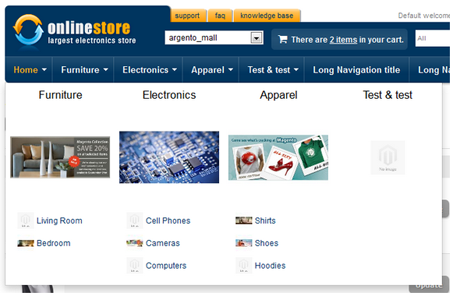
Get subcategories listing on any page of your Magento store
While looking for new products, customers commonly choose from product categories displayed on the homepage. Therefore, we are pleased to offer something more visual in order to encourage them to click. The best way to introduce the wide range of your store products is to display subcategories' block. Easy Catalog Images will help you to place it in Magento using widgets, xml code and default block code. It allows you to place a subcategories listing alongside current top level categories.
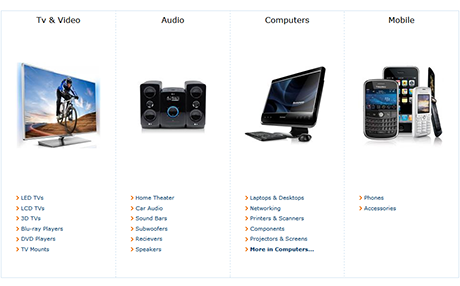
Easily create list of categories with images
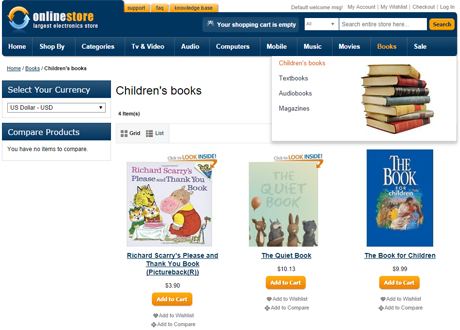
Easy Catalog Images extension allows you to show already assigned categories images and child categories images on the homepage and on the category page. Please notice, if you assign the image to the category, it will be displayed both on the Easy Catalog Images pages and on the category page of your web-store. So, we offer you to assign categories images to the thumbnail field in order to show all categories' images only in the Easy Catalog Images list block. For better user experience our extension allows to resize image, and to specify the width and the height attributes of the categories' images.
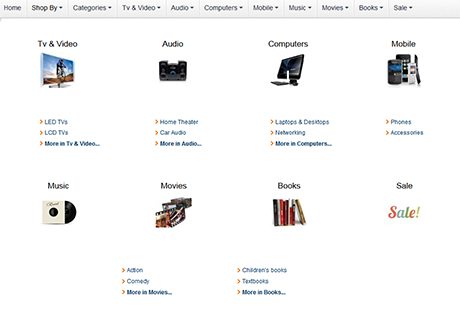
Show categories using Magento widgets
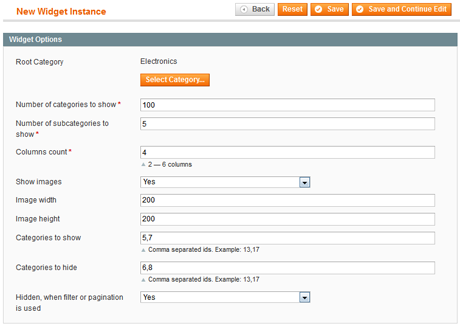
Easy Catalog Images will help you to create category listings by using Magento widgets on any store page according to your requirements. We recommend to use widgets to improve the performance and functionality of your Magento web-store. By using Easy catalog images widgets and Navigation Pro, you can set up a menu with a magento list of categories and images. Parameters of the widget can be configured in order to help you to customize the menu. You can select the number of current categories and sub-categories to be displayed, for instance. You can also specify the size of the image to be released, and the columns count.
Create Magento landing pages
Easy Catalog Images module allows you to add more keywords and links to the category page and also to the magento subcategory grid. It will surely improve your web-site SEO and save users' time. SEO optimized landing pages will give you better sales conversion. Moreover, you'll increase internet search ranking of your website.

List subcategories with limited number of its own child categories
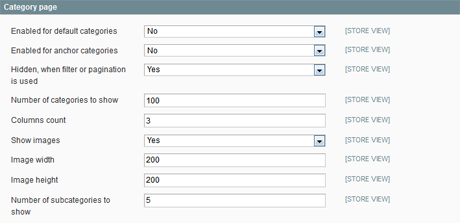
We do understand that every store has a different category tree and each category can have a different number of subcategories. That could cause problems related to formatting the list of subcategories. So, we have added a config option in order to limit the number of maximum subcategories listed below the parent category. Such option allows to create professional looking magento category list blocks.
All our Magento extensions also:
- 100% Open source
- 1 year of free support since purchase date
- 1 year of free upgrades
- 14 day money back guaranteed
- Don't affect Magento core files
- Improve your store usability and performance
- Help your store always be afloat by implementation new features and ideas
- Developed using Magento programming guidelines
- Free installation services for all commercial extensions and templates
-
Awesome customer service Review by bhq2015
Quality Service Design Product worked as advertised. Awesome customer service. Assisted with the installation. 100% professional. Awesome customer service. Assisted with the installation. 100% professional.
-
Awesome Review by Ron
Service Design Quality Works perfectly, would like the option of putting images below content on category pages.
-
AMAZING Review by Leah
Service Design Quality This extension was a terrific catch! It did exactly what we needed and was a combination of several of our needs all in one!
We will certainly look towards Template Master in the future to fill our Magento extension needs!
Thank you! -
Excellent product Review by Ali
Service Design Quality I have been using extensions from Template Master since the last 5 years. Their products are very good. Would be nice if they work a bit on their visual design
-
Exactly what i needed! Review by ruudiie
Quality Service Design This extension did exactly what i wanted and the support was great!!
Installed it and it didn't worked, so i contacted the developer and they gave me great support!
And now it works really fine!
Keep up the good work! -
Great for Resizing category images also Review by SilverFoxUnlimited
Quality Service Design This extension does great as advertised, but also provides a nice simple helper class to re-size any image including category images the same as product images can. The only hangup with it is that if you have a CDN using the sub-domain "media", a string matching function that it uses will match on the domain instead of file path resulting in a 404 error at the expected file path. Works on both CE and EE.
-
Excellent Support From Template Monster Teams Review by Shines90
Quality Service Design Hi,
I am very happy with this extension. They given good support for installation and also they designed according to my theme compatability.
In my Opinion I can recommed this Template Monster team to every one.
Specially i get quick reply from Peter ( Team Leader )
Many Thanks
shine -
Superb in every way Review by Lida
Service Design Quality This is something I have been looking for, but could not find it. Incredibly useful, and easy to customise. Whether you implement it to work automatically or via a widget.
And I was really amazed by the support I got. Truly outstanding. I could not get it to work right away, but got a response almost right away.
In the end I think I messed up something, but they fixed it in no time. And all this for a free extension!
Hats off for an excellent tool and an awesome support team. -
Great extention,wonderfull support Review by onlineunlocks
Service Design Quality The extension is great and easy to use,but had a small css issue that did not looked good on my store. I said to try and contact the support,even if has happened before to contact support from free extensions and never receive an answer.They answered in less then 24h and after providing a bit more info they fixed the problem for me
The extension is great and easy to use,but had a small css issue that did not looked good on my store. I said to try and contact the support,even if has happened before to contact support from free extensions and never receive an answer.They answered in less then 24h and after providing a bit more info they fixed the problem for me -
Very good, helpfull and fast support for a very good product!! Review by evdworp
Quality Service Design Very useful, saved me a lot of work. Our shop has a lot of categories and subcategories. without this product i had to make all the categories and subcategories including a picture.
Now the actualy work (installing) cost me 30 minutes (i am a noob).
the best part is the good support to make it look perfect. Very good help (and fast)
And that all for FREE !!!! -
Excellent product and excellent support Review by rosie
Service Design Quality This extensions is great, I made a suggestion to the developer, and they implemented it straight away and sent me the diff file. Could not ask for more!
View all reviews for Magento Easy Catalog Images 2.0.
Easy Catalog Images 2.5.0
20th May 2018- Fixed TM_CDN integration
- Allow to place category name below image via widget configuration Thanks to Makis Palasis
Easy Catalog Images 2.4.4
31th March 2018- Improved TM_Amp compatibility
Easy Catalog Images 2.4.3
28th February 2018- Improved responsive styles for widget layouts with 3 and 5 columns.
Easy Catalog Images 2.4.1
24th of April 2017- Improved AMP integration
Easy Catalog Images 2.4.0
9th of February 2016- Translation fixes
- Css styles moved to tm/easycatalogimg subfolder
- Fixed possible division by zero
- Improved responsive style rules. Updated media for tablets
- TM_Amp integration
Easy Catalog Images 2.3.3
25th July 2015- Added ability to set background_color for resized images from widget:
- Fixed transparent images resizing
- Added thumbnail attribute installation to prevent error in magento 1.9.1. Please rebuild catalog_category_flat index, if you still get error.
- Improved Automatic Image Assignment feature. Now it can search for products from nested categories.
Easy Catalog Images 2.3.2
23d March 2015- Added isSecure parameter to cache key
- Retina support added with srcset attribute
- Small css fixes
- Added std ul styles reset
- Five locales where added
- Widget refactoring to fix the 'Hide, when filter is used' option. Use the easycatalogimg/widget_list type instead of easycatalogimg/list.
Easy Catalog Images 2.3
17th February 2014- Ability to hide block, when filter or pagination is applied.
- Ability to show widget on category pages, when category config is disabled.
- Widget: Ability to set Root Category to load
- Widget: Ability to show and hide specific categories
- NavigationPro integration styles added
- NavigationPro integration guide
- Automated thumbnail assignment added. Script can fill category thumbnails with image of first product of corresponding category. If category has attached thumbnail already, it will be skipped. Only direct category children are processed. If category has no direct child products, thumbnail will not be assigned
- Css refactoring. Responsive styles added
- Added note about supported columns count to the widget interface
- Module sort order updated
Easy Catalog Images 2.0
21th November 2012General:
- Perfomance improvements. Dramatically decreased query count per block render (One query).
- Cache support added.
- Flexible grid styles added to support multicolumn mode for various site styles without modifying the styles. 2-6 columns are supported out of the box.
- Category thumbnail is displayed instead of category image by default.
- Widget support added. Widget is fully configurable with custom options. You can insert the Easy Catalog Images where you wish to. (Any cms page, block etc)
- EasyCatalogImages block is now shown above the category title. We did this to prevent numerous conflicts with custom themes.
- Maximum category count to show added.
- Ability to set the background color for resized image. White by default.
- 'Show categories listing' on homepage removed. Please use the homepage editor and add Easy Catalog Images widget directly to the homepage content.
- Ability to disable product listing removed. Please use the built-in Magento option on category edit page.
- 'Show child categories' field removed. Please use the 'Number of subcategories to show' field get the same result.
Other people marked this product with these tags:
- magento extension (21)
- categories (1)
- 1.4 (1)
- magento extensions (16)
- magento plugins (16)
- magento addons (16)
- magento modules (16)
- custom navigation (2)
- categories images (1)
Use spaces to separate tags. Use single quotes (') for phrases.
Check items to add to the cart or select all


Questions:
-
-2voteA: That can be done. Right now extension block is outputted to content container in easycatalogimages.xml. I would suggest you to put to category.products container and then at category/view.phtml your should call that block with childhtml method.Posted by Peter D. on Monday, February 25, 2013
-
0voteA: Could you explain that, because i really don't get what you mean.Posted by Peter on Thursday, February 28, 2013
-
0voteA: I asked the same question and I contacted the support team and they replied back with a solution that worked perfectly!In order to change postion of extension block on category products page please open easycatalogimg.xml and find next code:Change to:Then please open appdesignfrontendYOURPACKAGEYOURTHEMEtemplatecatalogcategoryview.phtml and place next code:right after categories listing name:Note: I had to flush cache on my website for me to see the changes.Thanks again Support Team !!! Your support even on FREE products is amazing!!!! I've been your customer for the last 3 years and I'm definitely a lifetime customer.Posted by Min on Wednesday, April 17, 2013
-
-6voteA: Sure, you can do that. You can simply insert that module as widget to your home page content.Posted by Peter D. on Thursday, August 4, 2016
-
-7voteA: Sorry but that isn't possible with out extension customization.Posted by Peter D. on Monday, July 7, 2014
-
-4voteA: 1. Your theme is missing some core Magento classes. So you should add to categories li container float left style.2. I think it's done using css so you should copy same styles to categories listing container.Posted by Peter D. on Monday, February 17, 2014
-
-5voteA: Figured it out. I was using a widget and had to also alter the settings there. Deleted old files off server just in case and all is well.Posted by Michael Davidson on Thursday, June 18, 2015
-
-7voteA: Please check next article http://templates-master.com/knowledgebase/index/view/faq/how-to-display-catalog-title-above-easy-catalog-blocks/Posted by Peter D. on Wednesday, July 9, 2014
-
-7voteA: There is simply no enough space. I would suggest to reduce margin that you have set for .products-grid li.item margin-right: 11px;Posted by Peter D. on Monday, February 3, 2014
-
-3voteA: No unfortunately for now only categories images are supported.Posted by Peter D. on Monday, December 9, 2013
-
-7voteA: Sorry do you have problems with placing Easy catalog images widget on home page?Posted by Peter D. on Friday, October 18, 2013
-
-9voteA: Yes... I don't see that widget. I am just trying to get the subcategories to show on their parent category pagesPosted by David Castillo on Friday, October 18, 2013
-
-6voteA: I place the widget and nothing happens. But I want it to work on the categories pages to show the sub categoriesPosted by David Castillo on Friday, October 25, 2013
-
-8voteA: Can you place link to your store so we can check what is wrong? Also have you enabled extension in extension configuration settings? Widget should be placed only for home page.Posted by Peter D. on Monday, October 28, 2013
-
-6voteA: It's only possible if you will add or remove this block with xml code for each category. There is no any configuration setting that allows to do that.Posted by Peter D. on Tuesday, March 14, 2017
-
-3voteA: Expires headers tag should be added using either Apach or Nginx server configuration.Posted by Peter D. on Monday, February 15, 2016
-
-5voteA: Please let us know link to your store.Posted by Peter D. on Sunday, January 19, 2014
-
-7voteA: Sorry but that isn't possible in current release. But i can suggest you to remove our extension block using xml and Custom Layout Update setting for categories where you want to remove that block.Posted by Peter D. on Thursday, November 21, 2013
-
-7voteA: Usually there is issue with write permissions for categories images media folder. Please check that issue first and then if you have enough place on your server.Posted by Peter D. on Monday, February 24, 2014
-
-4voteA: Sorry but that isn't possible right out of the box. You can only list all categories and exclude categories that you don't want to be listed.Posted by Peter D. on Monday, March 6, 2017
-
-8voteA: Please contact our support at http://templates-master.com/helpdesk so we can check that issue.Posted by Peter D. on Friday, April 18, 2014
-
-5voteA: Sorry but i see store without any styles at all at the persiandise.com/artPosted by Peter D. on Monday, December 9, 2013
-
-3voteA: You should copy extension files into your ultimo package in order to use our extension with that theme.Posted by Peter D. on Monday, August 5, 2013
-
Magento One Page Checkout - Fire Checkout 4.3
![Magento One Page Checkout - Fire Checkout 4.3]() Improve your store sales! Allows clients make a purchase faster and easier by providing them a simple checkout page. Supports all major payment and shipping methods.
Improve your store sales! Allows clients make a purchase faster and easier by providing them a simple checkout page. Supports all major payment and shipping methods. -
Magento Ajax Pro 3.3
![Magento Ajax Pro 3.3]() Improve your store usability. Using the extension, you allow customers to add products to a cart and edit a shopping cart content faster without page reload.
Improve your store usability. Using the extension, you allow customers to add products to a cart and edit a shopping cart content faster without page reload. -
Magento Easy Banners
![Magento Easy Banners]() Manages banners, pop-up windows and custom blocks at your store right from admin interface. Allows you to track the total number of views and impressions of banner.
Manages banners, pop-up windows and custom blocks at your store right from admin interface. Allows you to track the total number of views and impressions of banner.