- Home /
- Free Magento Absolute Template (available in 10 colors)
Check one of the most popular Magento themes
Please check our template and you will see that it is easily customizable. This template is the best option if you only wish to test Magento and if you don’t want to invest into commercial themes. This template is a perfect solution for any kind of store. It is commonly used by both small stores and well-established stores.
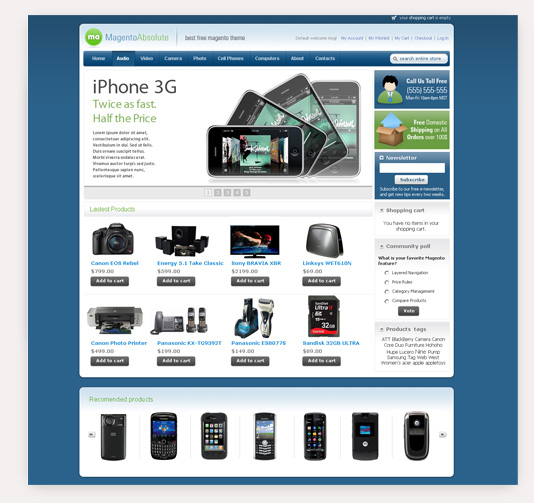
Absolute template is based on a 2-column home page layout with an image slider on the main page. The JavaScript slider on the home page is easy to use and SEO friendly. The theme comes in 10 colors: green, grey, orange, pink, red, sea green, silver, violet and yellow.
Free Absolute template is available under Creative Commons License for commercial and personal use. Please buy commercial license if you want to remove copyright from footer or need any other service of ours.

Magento Absolute theme will help you to:
- Make your store catchy
- Quickly start your first Magento store
- Choose among various colors to adapt the theme to your company style
Improved store design:
- Separate featured product blocks with a slider on main page
- View the product information by simply using the quick product overview.
- The newsletter subscription and popular tag blocks are on the main page
- Both My Cart and Compare product blocks are on the main page
-
Not just a good theme ... Review by Paul
Service Design Quality The great joy of buying from these guys is that the extensions work really well and you get quick and useful support with installation (or any other query). Very important for those of us who are happy to dabble but do not live tech. So buy with confidence would be my experience.
-
GREATTTTT Theme Review by MS_Trading
Quality Service Design Theme works a treat would recommend this developer great work keep it up :)
Have just installed this theme on magento cummunity edition 1.8.1.0 installed with no problems and all seems to function as it should nice work keep it up :) although i am still trying to figure out how to change the colors of the theme but i will get there have tried how it says but does not change color maybe something i am doing wrong but still a great theme all the same -
Edita Review by Edita
Design Quality Service Very karasivy and profitable design. And very featuring support. I am new to Web design and could not itself set the pattern, and the guys with the support I have set a pattern. Thank you very much.
-
Great Template Review by My2Cents
Service Design Quality this is a great template, I use it when ever I want to test a new store idea... It gives my new store sense of professionalism...
If the idea works out ... I know upgrading to a TM paid template will be a breeze... Now that is available in 10 colors.. I have even more choice about the look of my store...
this is one of the best Free templates for good reason... TM is one of the companies to work with... support is excellent.
-
imazing I rate 5 stars Review by template_master fancy
Service Design Quality this is my imagination template ever wish... special thanks to whom made this fantastic to my dream.. god bless you...please continou develop of your imagination...wish you're best !!!
-
Best Theme/Template I have used Review by Paul Ridley
Service Design Quality Honestly this is the most professional and well done template I have used. (I have used about 15 so far) Has old ( 1.3.2.4) and new (1.4.0.0/1.4.0.1) version with easy installation guide which includes slider bar. The template itself is very clean and visually appealing. Thanks so much and PLEASE continue to make templates as they are much appreciated.
View all reviews for Free Magento Absolute Template (available in 10 colors).
Free Magento Absolute theme 2.0.0
23th January 2015- Theme moved to separate f001 package
- Automatic installer added
- Configurable Swatches integration added
- Added ability to include custom.xml layout update with user changes
- Sprite based buttons replaced with css3 gradients
Free Magento Absolute theme 1.8.1
20th January 2014- 1.8.1 compatibility release
Other people marked this product with these tags:
- magento theme (57)
- magento template (57)
- magento themes (57)
- magento templates (57)
- magento design (57)
- free themes (2)
- free theme (2)
- free magento template (2)
- free magento theme (2)
Use spaces to separate tags. Use single quotes (') for phrases.
Check items to add to the cart or select all


Questions:
-
0voteA: We do expect next version of this template within next 1-2 weeks. From our initial experience there should be no problem for using this template on magento 1.6.Posted by Support Team on Friday, August 26, 2011
-
0voteA: I'm sorry but we have this section works great on 1.5 on many stores. Can you send link to your store so our support team can check what is wrong?Posted by Support Team on Wednesday, June 8, 2011
-
0voteA: First of all, I've tried to vote for this question and I received an Magento error: Error log record number: 114064501.I have the same problem. It seems that sometimes appear, sometimes not. First time I've installed Magento through Downloader (version 1.5.1.0), I've added 2 categories, 3 products (for test) and I've installed this theme directly and everything was fine.After few days, I've trying to reproduce my live store and because the 1.6.0.0 stable version was online, I had downloaded the 1.5.1.0 version and I've installed. After installation I've put database from my live store and after that I've installed this theme. At this time the same problem has occurred. The section featured was directly filled with products. Even after I've set some featured products, the system didn't care. It filled with the same products every time.Clear cache, reindex, clear the var directory and so on, have no result. If the team support has found a solution for René van den Boogaard, hope they will wrote it here. My website is http://dev.nutrienti.eu Any suggestion?Thanks!Posted by Lucian Nan on Sunday, August 21, 2011
-
0voteA: Yes sure. This theme was already updated to recent 1.5 version.Posted by Support Team on Tuesday, March 8, 2011
-
0voteA: Sorry can you post there link to your store so we can check that issue?Posted by Peter D. on Sunday, November 17, 2013
-
0voteA: Sorry but i think it's misunderstood. Installation instructions for that template are still valid for Magento Community Edition 1.7.Posted by Peter D. on Sunday, October 21, 2012
-
0voteA: You should no assign any theme at home page design section. This setting will overwrite settings in store config.Posted by Support Team on Monday, January 24, 2011
-
0voteA: Sorry but i don't see that problem. Right now at your site i can see that your store has more categories in top menu then it have space for.Posted by Peter D. on Tuesday, December 29, 2015
-
0voteA: Sorry have you set any product as new in admin?Posted by Peter D. on Friday, September 6, 2013
-
0voteA: Hi Robert,Login into the admin panel>CMS>Pages>Homepage. Under the Design Tab>Custom Layout>Custom Theme. Change the setting from "f001" to "-Please Select-" If you have selected the silver color in the configuration>design>skin then it should change color upon save.Hope this helps!JRPosted by Jr Erspamer on Tuesday, February 11, 2014
-
0voteA: We just checked your site and it looks like you have older 1.3.2.4 system template files at your store.Posted by Support Team on Friday, February 11, 2011
-
0voteA: Thank you for you quick response. Can you do an educated guess which folder/section that could be? Thanks in advance again for your support and great theme!Posted by Ali Tuzcu on Friday, February 11, 2011
-
0voteA: Please check if your products are set in stock. Also your should try refresh cache and magento indexes.Posted by Support Team on Friday, December 10, 2010
-
-1voteA: You can use next code in order to add sidebox navigation on left column.Posted by Support Team on Saturday, September 4, 2010
-
0voteA: If you want to enable separate theme for mobile devices you can use exceptions in System > Configuration > Design.Posted by Peter D. on Monday, May 16, 2016
-
0voteA: hi, i do have change in in System > Configuration > Design, Matched Expression fill out iPhone|iPod|BlackBerry|Palm|Googlebot-Mobile|Mobile|mobile|mobi|Windows Mobile|Safari Mobile|Android|Opera Mini, Value fill out iphone, but when i visit my site with cell phone, it is not a mobile version, when i deleted your theme "f001", the mobile version is working fine.Posted by Luis Soto on Thursday, May 19, 2016
-
0voteA: Please contact our community support at https://swissuplabs.com/magento-forum/. They will be glad to help you.Posted by Peter D. on Thursday, May 19, 2016
-
0voteA: We will release 1.8 compilable version of that theme within next 7-10 days.Posted by Peter D. on Monday, October 7, 2013
-
0voteA: I would sugest to open custom.css line 62 and check next styles.cms-home .nav-home a, .contacts-index-index .nav-contacts a, .cms-about-magento-demo-store .nav-about a { ****You should add similiar selector for your cms pages in order to make them active. For example for default about us page it looks like .cms-about-magento-demo-store .nav-about aPosted by Peter D. on Wednesday, February 13, 2013
-
0voteA: Never mind it, i resolved also this issue...Posted by Erik Johansen on Tuesday, November 20, 2012
-
-1voteA: Never mind it, i resolved also this issue...Posted by Erik Johansen on Tuesday, November 20, 2012
-
0voteA: Sorry can you post link to your store so we can check how it looks like now?Posted by Peter D. on Monday, November 5, 2012
-
0voteA: sorry my english.I have a similar problem when I add the class and he and placed on the line below unformatted and error in the search box of the site, follow the link below store http: www.mjbconstrucao.com.br/lojaPosted by Matheus Baldo on Saturday, December 26, 2015
-
0voteA: Really sorry but it isn't possible to explain how to apply such modification within a product question. It will require editing multiply files.Posted by Peter D. on Friday, October 5, 2012
-
Magento Easy Navigation
![Magento Easy Navigation]() Make navigation at your store really easy. Allows you to chose navigation type, number of navigation levels,navigation columns count and levels per dropdown.
Make navigation at your store really easy. Allows you to chose navigation type, number of navigation levels,navigation columns count and levels per dropdown. -
Magento One Page Checkout - Fire Checkout 4.3
![Magento One Page Checkout - Fire Checkout 4.3]() Improve your store sales! Allows clients make a purchase faster and easier by providing them a simple checkout page. Supports all major payment and shipping methods.
Improve your store sales! Allows clients make a purchase faster and easier by providing them a simple checkout page. Supports all major payment and shipping methods. -
Magento Easy Banners
![Magento Easy Banners]() Manages banners, pop-up windows and custom blocks at your store right from admin interface. Allows you to track the total number of views and impressions of banner.
Manages banners, pop-up windows and custom blocks at your store right from admin interface. Allows you to track the total number of views and impressions of banner.