
Magento EasyFlags

25 Jun

We were asked hundreds of times about oscommerce like language switcher for magento. And now we are glad to introduce new community extension Magento EasyFlags. This small extension will help anyone to convert default magento store view switcher into nice flag buttons. Installation and configuration will take approximately 5 minutes. No files are replaced and no codding experience needed to install!

Please check demo at our demo server.
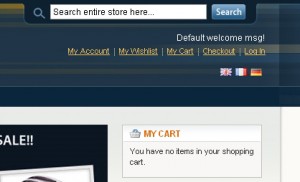
Magento Easy flags demo

53 Responses to “Magento EasyFlags”

  1. Gert September 19, 2009 at 3:05 pm #

    Ive installed it and it works ok…except for one flag which does not show up (you see a broken images mark)
    What can i do to clear this up?

    • TemplatesMaster September 23, 2009 at 4:01 pm #

      Ive installed it and it works ok…except for one flag which does not show up (you see a broken images mark)
      What can i do to clear this up?

      Hello Gert, what flag is broken? Can you send us link to your store?

  2. Gert October 6, 2009 at 2:49 am #

    i diabled it now because it looks a bit weird. Any ideas where to look?

  3. Gert November 8, 2009 at 8:48 pm #

    found it. You made two mistakes. First there was the wrong flag and second it was wrongly named (england.gif instead of en.gif)
    Works now.

    • TemplatesMaster November 18, 2009 at 10:24 am #

      found it. You made two mistakes. First there was the wrong flag and second it was wrongly named (england.gif instead of en.gif)
      Works now.

      Hello Gert, i think you should look for UK flag at gb.gif file. Please check ISO 3166-1 alpha-2 country codes for right countries codes.

  4. Jorn November 27, 2009 at 12:42 pm #

    Hi,
    I’m trying your extension but can’t get it to work yet. I renamed my storeview codes to “gb” and “nl”. In the configuration I enabled the Easy-flags extension for every store. And I logged out as administrator. Unforunately I don’t see any flags. I’m using version 1.3.2.4. All the flag images are present on the server.

    • TemplatesMaster November 27, 2009 at 12:49 pm #

      Hello Jorn, please contact us at our store contact form with your store details so we can check what is wrong.

      • Jorn November 30, 2009 at 5:17 pm #

        The problem was indeed that I had multiple stores instead of multiple storeviews

  5. Jorn November 30, 2009 at 5:18 pm #

    Very good component! Thanks for the quick support as well! 5/5

  6. Tommy January 13, 2010 at 2:37 am #

    Wher do I Rename thestore view codes according to ISO 3166

    • TemplatesMaster January 19, 2010 at 10:20 am #

      Hello Tommy, You can do this at admin > system > store management. But you can also rename flags icons names so they will have same name as your storeviews codes.

  7. Timothy January 30, 2010 at 12:24 am #

    Hello, this extension looks promising, but I have one problem: after the extension installation & logging out and back in, there *is no* Templates-Master part in System > Configuration.

    Emptying the cache doesn’t do any good. Might this be related to the latest Magento version (1.3.2.4) I am using, or, possibly something to do with extension directory chmod values?

    • TemplatesMaster February 4, 2010 at 7:27 am #

      Hello Timothy,

      extension was not fully installed. You can try reinstall it from magento connect or download it from our store.

  8. Max February 6, 2010 at 2:19 am #

    Hi.
    Could you advice how I can move the flags from the center to the right, where was originally language menu.
    Thanks

    • TemplatesMaster February 13, 2010 at 8:33 am #

      Hello Max, it replace default block. If it’s moved to different position then probably you should edit easyflags.css and change position for #easyflags

  9. Fa February 9, 2010 at 1:01 pm #

    Thank you for this extension,
    but I have the same problem as Timothy.

    I’m using the latest Magento version and have been re-installing and uninstalling this extension many times… still no sign that this extension is working…

    Could you help please?

    Thank you

    • TemplatesMaster February 13, 2010 at 8:38 am #

      Hello Fa, what is your magento version?

  10. Monica February 11, 2010 at 7:05 pm #

    Hi,

    How did you putted the store view code on the website url (http://extension01.templates-master.com/de/ ) ?
    Thanks.

    Monica

    • TemplatesMaster February 13, 2010 at 8:41 am #

      Monica, sorry what do you mean by “putted the store view code”. We set storeview codes to country iso codes. But you can also rename flags codes to corresponding storeview codes.

  11. Olix March 10, 2010 at 1:26 am #

    Hi. I’m getting “Access Denied” when I try to click Easy Flags in the back-end. I cleared cache, sessions, install and uninstall extension hundred times. Magento 1.3.2.4. Do anyone have idea why is this happening?

    • TemplatesMaster March 10, 2010 at 3:49 pm #

      Olix, please contact us and we will send you old extension version.

      • Sander March 17, 2010 at 11:36 am #

        Could you please sent me that older version as well? I’m also getting nothing in the configuration pages or acces denied.

        Thanks in advance!

        • TemplatesMaster March 28, 2010 at 12:52 pm #

          Hello Sander, please contact us at contact us form.

      • sašo March 23, 2010 at 5:25 pm #

        I’ve got also access denied, could i get old extension. I have 2 stores, each one having 1 store view (is this a problem as i’ve read something regarding this few posts before).

        • TemplatesMaster March 28, 2010 at 1:05 pm #

          Hello Saso, please contact us and we will send you previous extension version.

      • ORlando March 24, 2010 at 7:13 pm #

        Hello, I also get denied access, for both easy flags and easy lightbox. I’m running Magento 1.3.2.4, one store, multiple storeviews (per language). On a test site.

        Thanks in advance.

  12. Carlos Rueda March 30, 2010 at 6:17 pm #

    Hello,

    Firstly thank you for making available all these packages for magento

    I have the version 1.4.0.1 of Magento running, I installed the Easyflags throught Magento connect, I enabled the extension and renamed the stores, log out of the control pannel but it is not working, I still having the dropdown menu instead of the flags. Also I would like to have the flags on the header instead of the footer. How can I do this.

    Thank you for your help.

  13. Alejandroccs April 15, 2010 at 7:07 am #

    I have the version 1.4.0.1 of Magento running, I installed the Easyflags throught Magento connect, but I can not see the “Template-Master” under System>Configurations> I have flushed the cache, uninstall and install it back (magento says installation OK) and nothing any Suggestions?

    Thank you.

  14. Jeyhun April 21, 2010 at 5:40 pm #

    Nice extension!

    My image hints or alt tags are not showing for some reason. I can see them in page source though. Any idea?

    Thanks.


    Mage 1.4.0.1

  15. odela July 2, 2010 at 7:54 pm #

    I have a problem. it is working great on my shop, but now I created a multistore, so 2 domains , 2 shops, diferent store name and store view, but when trying to call “es” and “gb” for the easyflags, it says “duplicate entry code”.
    so I cannot make it work on 2 shops under the same panel.
    any trick to fix this?

    • TemplatesMaster July 5, 2010 at 10:27 am #

      Odela, you can simply create different copies of same icon with different name.

  16. Ariel July 27, 2010 at 11:47 am #

    I have added the extension in a test store and it works but i only have the ISO codes and links i.e. gb in blue and underlined.

    I am using Magento 1.4 and used magento connect manager to download the extension.

    how do I get the flags to show?

    • TemplatesMaster August 3, 2010 at 9:37 am #

      Please let us know how we can check your store.

  17. G bonkers September 8, 2010 at 5:28 pm #

    After I’ve installed the extension and go to the Easy Flags page nothing shows up on the page.

    I’m using Magento 1.3.3.0, same problem with v0.5

    • TemplatesMaster October 2, 2010 at 8:39 pm #

      Have you tried using recent extension version?

  18. diesel September 12, 2010 at 8:48 pm #

    Bravo, que palabras…, el pensamiento excelente

  19. Gregory Art October 6, 2010 at 12:44 pm #

    Hi,

    I have installed this extenssion on Magento 1.4.1.1.
    Magento connect says it is ok , but it does not appears in admin or front.
    I wateched on the server and files seem to be not present.
    For example the directory /app/design/frontend/default/default/template/easyflags/ is not present.

    Is there a posibility to install it manualy ?

    Thanks

    Gregory Art

    • TemplatesMaster October 25, 2010 at 5:43 pm #

      Gregory you can download this extension from our store in case you have problems with magento connect.

  20. Schedule October 30, 2010 at 1:56 am #

    You you should change the webpage subject Magento EasyFlags | Magento Themes Blog to something more catching for your blog post you create. I enjoyed the the writing all the same.

  21. Marios November 1, 2010 at 6:36 pm #

    I have manually installed easy flags but cant get it to work. Do i need to edit something (file(s)). I have a theme installed which is not in the default/default directory. I copied the files accordingly but still no language flags appear. Do you have any suggestions for me?

    • TemplatesMaster November 15, 2010 at 6:14 pm #

      You should also either rename flags to have same filenames as your store codes or change store codes names to be the same as country iso codes.

  22. pocket knifes November 17, 2010 at 5:54 am #

    Que รบtil topic

  23. John Big December 20, 2010 at 2:56 pm #

    hello, magento 1.4.2 when i installed easy flags the admin configuration/setting is access denied

    i have installed EasyFlag extension and after this i got Access denied when im trying System > Configuration

    re-save admin role and logging out after instalation doesnt work, still Access Denied…

    why?

    • TemplatesMaster December 27, 2010 at 1:28 am #

      Sorry have you installed from Magento connect or from our store?

  24. Michelle Nielsen December 29, 2010 at 3:15 am #

    I installed manually both Ajax search & Autocomplete and the prolabels extensions. I might say – I am disappointed that you dont mention anywhere in the description that Prolabels extension isnt compatible with anything else than magento 1.4. Also – I get access denied in backend for both – I tried everything stated here – nothing works.
    Please email me… I am getting very frustrated.

    • TemplatesMaster December 29, 2010 at 7:34 am #

      Please contact us at our store contact form. We have this extension both for 1.3.2 and 1.4 magento version.

  25. Amr July 16, 2011 at 1:11 pm #

    Hello
    I installed easy flags on Magento 1.6 , but after accessing “template master >> easyflags” I find
    404 Error

    Page not found.

    • TemplatesMaster August 5, 2011 at 10:57 am #

      You should try log out from admin and then log in back.

  26. Adron July 17, 2011 at 4:18 pm #

    Thanks a bunch, that saved me some time. How much of your time have you spent blogging Magento? You must be an online ninja at it!

    Thanks again, Adron.

  27. Marjan March 6, 2012 at 5:55 pm #

    I tried to install this extension using magento connect, but it says community/magento_easy_flags: Version for ‘magento_easy_flags’ was not detected
    Can you please tell me where can i download the package because i can’t find that on your website.

  28. Manu August 18, 2012 at 9:19 pm #

    Thanks for the great app!
    I am trying to change the Alt for each country. Ie: should say ‘anglais’ when you hover the English flag while surfing on the english version.

    Can you guide me into a work around perhaps?
    http://www.animaviva-publisher.com
    Thanks!!!
    Manu

  29. KAmil January 2, 2013 at 1:59 pm #

    Hi!

    I have just installed this extension but it doesn’t work.
    I don’t have any flags on frontend.
    It’s enabled.
    I created 2 store views also.
    Could You help my?

Leave a Reply